NEWS

Apple Seeks Tariff Exclusion on Mac Pro Parts Imported from China

07/24/2019

3001

Apple Seeks Tariff Exclusion on Mac Pro Parts Imported from China


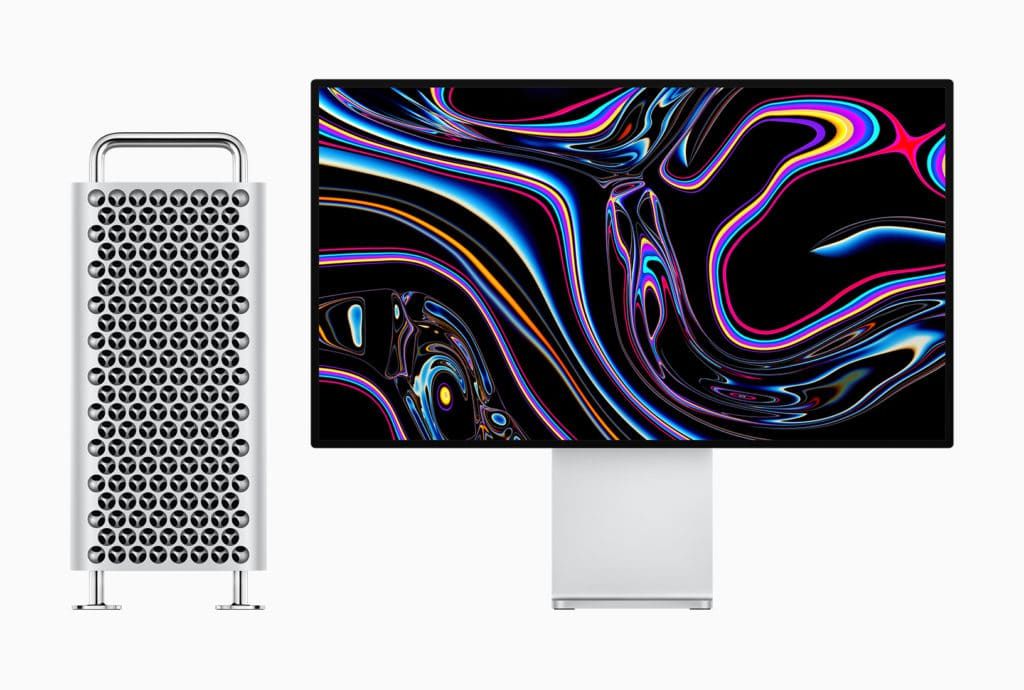
Last month, Apple moved Mac Pro production to China despite the escalating trade wars. Now the company has approached Trump administration asking to exclude components for Mac Pro from import tariffs.


Apple is seeking the administration not to impose 25% duties on Mac Pro parts including a stainless steel frame, internal cables, circuit boards as per the filings by the Office of U.S Trade Representative.


As part of the process, the filings will be opened up for public comment and reviewed thereafter. The U.S Government has excluded Apple products like the Apple Watch and AirPods from import tariffs. President Donald Trump has mentioned earlier that parts which can only be obtained in China and are not strategically important to Chinese industrial programs will not face a tariff. On the other hand, Trump had also said that the U.S will impose a tariff on imported aluminum and steel. Additionally, Apple is also seeking duty exclusions on Magic Mouse and Magic Trackpad.


Apple is shifting Mac Pro production from Texas to China. The new Mac Pro is going on sale later this year and is priced starting at $5999. A quick recap, the new Mac Pro sports an Intel Xeon with up to as much as 28 cores that get a whole 300 watts dedicated to them. The Mac Pro can be updated to as much as 1.5TB thanks to the 6 memory channels that support up to 12 DIMM modules clocked at up to 2933MHz. Furthermore, PCIe expansion will let you use existing PC hardware with the new Mac Pro.


Source: iphonehacks

Windows
Mac OS
iOS
Linux
3uTools
Win 64-bit For this device
V9.01 2025-12-27
Download
Win 32-bit For this device
V9.01 2025-12-27
Download
3uTools
Intel Chip How to Identify Chip Type
V9.01 2025-12-31
Download
Apple Silicon
V9.01 2025-12-31
Download
How to Identify Chip Type
1.  Click the Apple icon in the top-left corner of the screen and select About This Mac.
2.  Check the Processor or Chip field to determine if it is "Intel" or "Apple".
Please use the 3uTools PC client to install the iOS client:
1、 Install either the Windows or Mac version of 3uTools on your computer
2、 Open the PC client and connect your device to the computer via USB cable
3、 After the connection is successful, wait for the computer to automatically install the mobile app for the device, or locate “Install Mobile App” on the computer and manually click to install.
3uTools
deb file
V3.01 2025-11-20
Download
rpm file
V3.01 2025-11-20
Download
Windows
Windows
iOS
iOS
Android
Android
TV
TV
3uAirPlayer
Win 64-bit For this device
V6.0.2 2025-11-19
Download
Win 32-bit For this device
V6.0.2 2025-11-19
Download
iOS Device Mirroring (No App Required)
1、 Install 3uAirPlayer on the Windows PC
2、 Open Control Center and select Screen Mirroring
3、 From the list, choose your PC to start mirroring
4、 Or connect your iOS device to the PC via USB to begin mirroring
Scan to get "3uAirPlayer" App
3uAirPlayer TV V1.0.18
2025-11-28
TV System Requirements: Android 7.0 or later
Download the TV installation package, copy it to a USB drive, insert it into your TV or set-top box, then select the file from the home screen to install.