NEWS

You Need this Ugly Christmas Sweater that Actually has a Digital Fireplace

12/01/2017

2948

You Need this Ugly Christmas Sweater that Actually has a Digital Fireplace


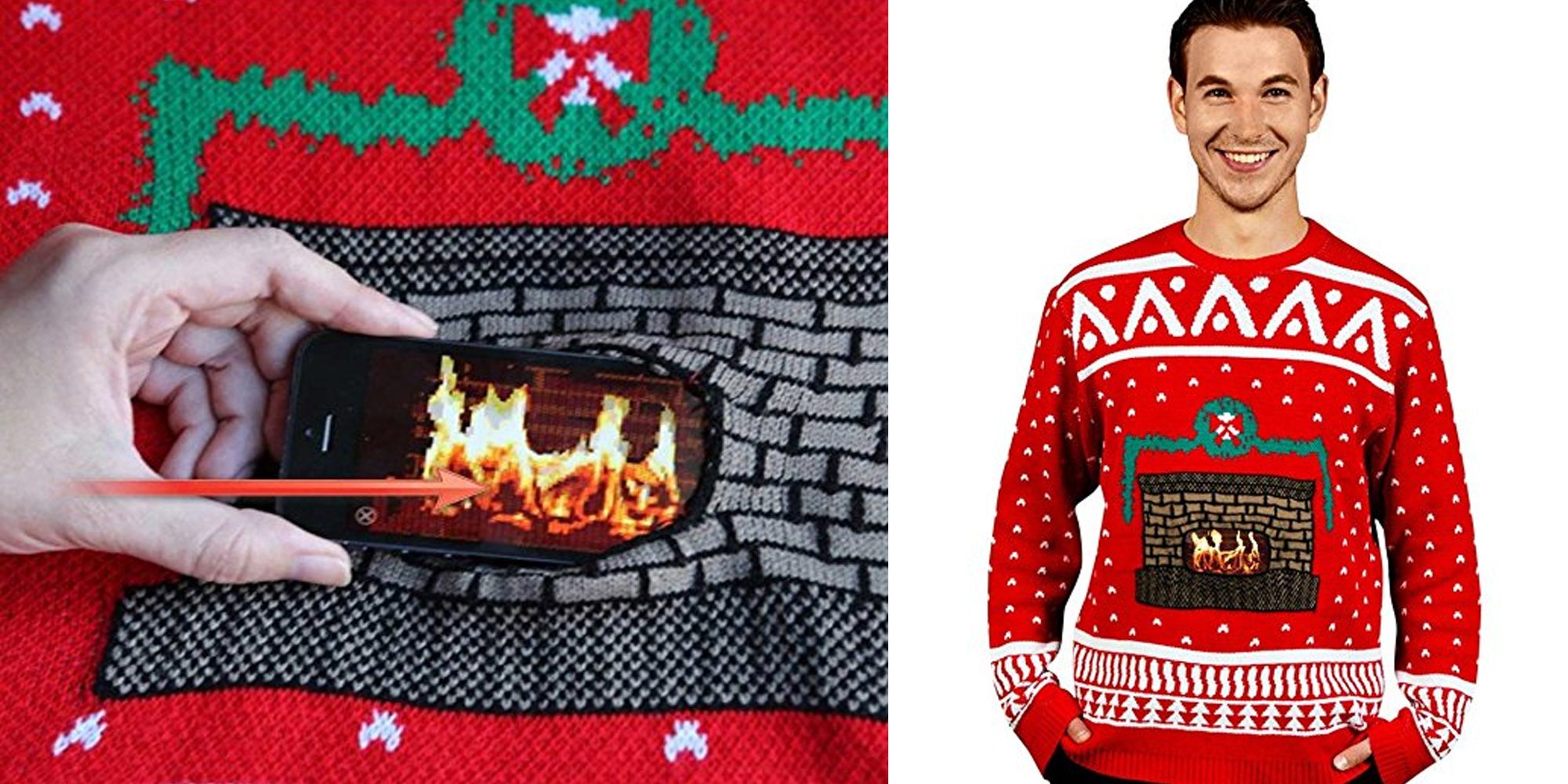
When I first saw this sweater I thought “What has this world come to…” But then I realized this is the ugly Christmas sweater I’ve been waiting for. Seriously, I’ve never been big into those ugly sweater contests, but this is just awesome. Using your phone, you can place a fire in the center of the fireplace embroidered on this ugly Christmas sweater. With pricing ranging from $42-$91 on Amazon, this ugly sweater isn’t the most affordable one out there, but I thought you should know about it regardless. Shipping varies by size but is either free or around $12.


If you’ve got that ugly sweater contest to go to, seriously, pick this up. Whether you win or not, everyone will wonder how the fireplace is actually “burning” in the center. And with a quick double-tap, you can turn the fire off (and back on again).


What to expect:

  • The Crackling Fireplace Christmas Sweater will help warm your hands on those cold winter days

  • 3 simple steps to bring the sweater to life: 1) Download the free app 2) Insert your smartphone running the Crackling Fireplace animation 3) The sweater is alive. Double tap the animation to switch it on and off

  • Brought to you by a NASA scientist and Morphsuits, the world’s most popular costume brand


Source: 9to5mac


Windows
Mac OS
iOS
Linux
3uTools
Win 64-bit For this device
V9.01 2025-12-27
Download
Win 32-bit For this device
V9.01 2025-12-27
Download
3uTools
Intel Chip How to Identify Chip Type
V9.01 2025-12-31
Download
Apple Silicon
V9.01 2025-12-31
Download
How to Identify Chip Type
1.  Click the Apple icon in the top-left corner of the screen and select About This Mac.
2.  Check the Processor or Chip field to determine if it is "Intel" or "Apple".
Please use the 3uTools PC client to install the iOS client:
1、 Install either the Windows or Mac version of 3uTools on your computer
2、 Open the PC client and connect your device to the computer via USB cable
3、 After the connection is successful, wait for the computer to automatically install the mobile app for the device, or locate “Install Mobile App” on the computer and manually click to install.
3uTools
deb file
V3.01 2025-11-20
Download
rpm file
V3.01 2025-11-20
Download
Windows
Windows
iOS
iOS
Android
Android
TV
TV
3uAirPlayer
Win 64-bit For this device
V6.0.2 2025-11-19
Download
Win 32-bit For this device
V6.0.2 2025-11-19
Download
iOS Device Mirroring (No App Required)
1、 Install 3uAirPlayer on the Windows PC
2、 Open Control Center and select Screen Mirroring
3、 From the list, choose your PC to start mirroring
4、 Or connect your iOS device to the PC via USB to begin mirroring
Scan to get "3uAirPlayer" App
3uAirPlayer TV V1.0.18
2025-11-28
TV System Requirements: Android 7.0 or later
Download the TV installation package, copy it to a USB drive, insert it into your TV or set-top box, then select the file from the home screen to install.