 NEWS
NEWS
New Study Shows iPhone 8 & iPhone X Fast Charging Slower Than Android Phones
 12/04/2017
 2914
2914
The iPhone X and iPhone 8 are Apple’s first smartphones to officially support fast charging with USB-C. A new study from Tom’s Guide, however, shows the iPhone X and iPhone 8 both lag behind competing flagship Android devices in terms of fast charging capabilities…
The testing was done using included fast charging accessories with the OnePlus 5T, LG V30, Google Pixel 2, and Galaxy Note 8. We broke down the differences between chargers for iPhone earlier this year right here.
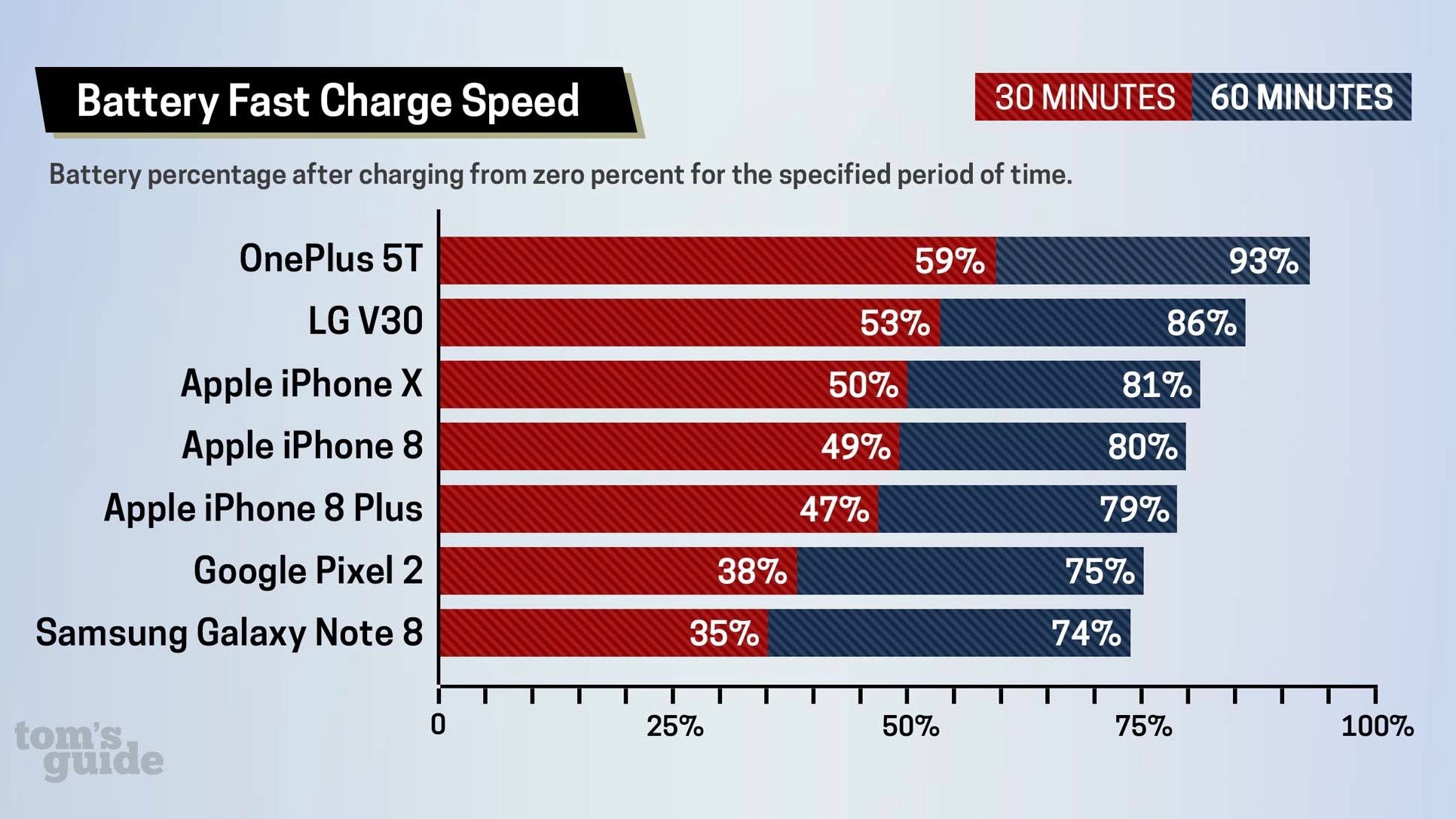
Firstly, the devices were tested in 30 minutes of charge time. The OnePlus 5T led the way, reaching 59 percent in half an hour. In second was the LG V30 at 53 percent. The iPhone X, iPhone 8, and iPhone X then rounded out the top five with 50 percent, 49 percent, and 47 percent, respectively.
From there, Tom’s Guide tested fast charging for an hour. Results were similar to the first test, with the OnePlus 5T leading the pack at 93 percent, the V30 at 86 percent, the iPhone X at 81 percent, the iPhone 8 at 80 percent, and the iPhone 8 Plus at 79 percent.
For comparison’s sake, when charging with the USB accessories included in the iPhone’s box, the iPhone 8 snagged 30 percent of juice in 30 minutes and 58 percent in an hour. The iPhone 8 Plus locked in 26 percent and 55 percent in 30 minutes and 60 minutes, respectively. The iPhone X was considerably slower at 17 percent in 30 minutes and 37 percent in an hour.
What's notable here is that the latest iPhones all perform slower than computing flagship Android phones, even though you have to spend extra to get the fast charging capabilities in the first place. While the difference may be marginal to some people, it does show the work Apple has to do in order to compete with other Android devices in fast charging.
Source: 9to5mac










