NEWS

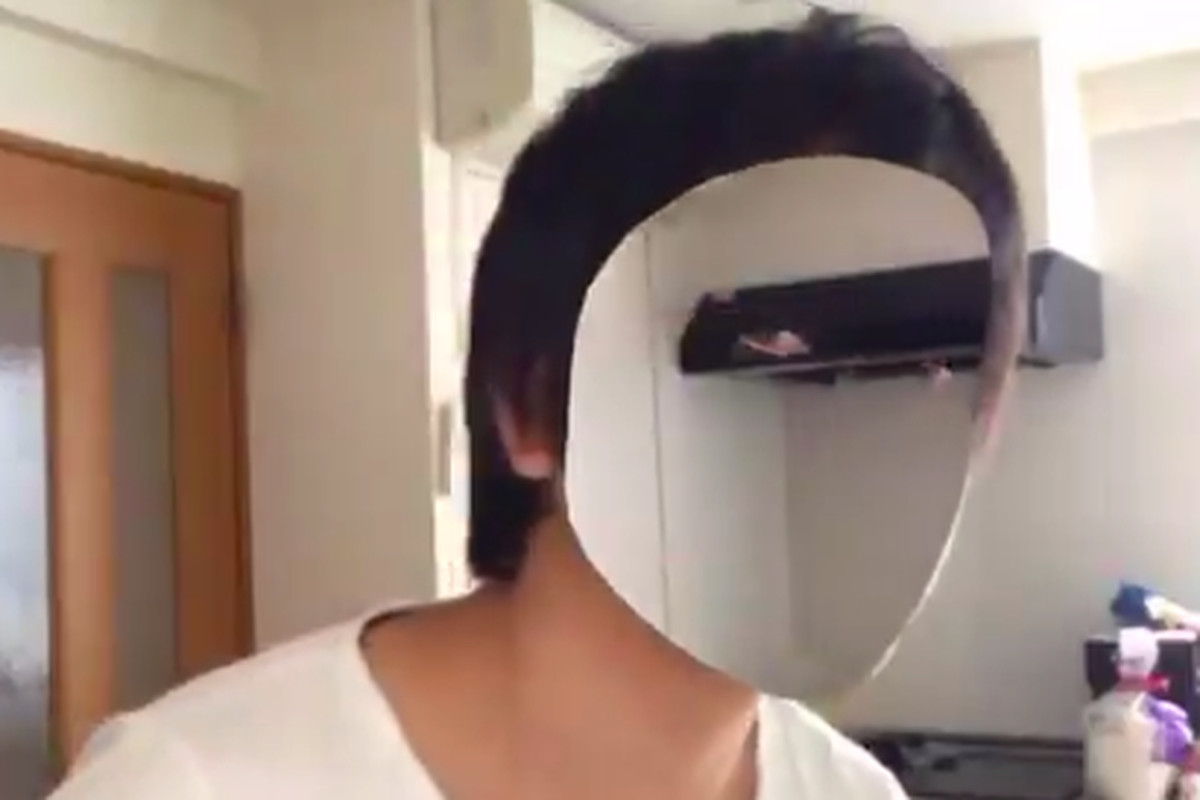
This Developer Made his Face Invisible With the Help of An iPhone X

12/28/2017

2758

This Developer Made his Face Invisible With the Help of An iPhone X


The iPhone X’s face-tracking capabilities range from supremely cute to oh, that might be useful. Now comes something truly terrifying. A Japanese app developer named Kazuya Noshiro has tweeted a preview of an app he’s working on that camouflages a user’s face with the background (first spotted by Design Taxi). The brief, ten-second video shows Noshiro moving his transparent face around to reveal the contents of his home through his head.


The effect is like a creepy, see-through beauty mask — similar to Harry Potter’s invisibility cloak. According to Noshiro’s tweets, the app was made on game development platform Unity, and uses a fixed camera position to shoot a background in order to create the illusion. There’s no word yet on when the app will be released or what exactly it will be used for. But chances are good that it’ll serve the same purpose as every other consumer-focused AR effort so far: novelty.


Source: the verge

Windows
Mac OS
iOS
Linux
3uTools
Win 64-bit For this device
V9.01 2025-12-27
Download
Win 32-bit For this device
V9.01 2025-12-27
Download
3uTools
Intel Chip How to Identify Chip Type
V9.01 2025-12-31
Download
Apple Silicon
V9.01 2025-12-31
Download
How to Identify Chip Type
1.  Click the Apple icon in the top-left corner of the screen and select About This Mac.
2.  Check the Processor or Chip field to determine if it is "Intel" or "Apple".
Please use the 3uTools PC client to install the iOS client:
1、 Install either the Windows or Mac version of 3uTools on your computer
2、 Open the PC client and connect your device to the computer via USB cable
3、 After the connection is successful, wait for the computer to automatically install the mobile app for the device, or locate “Install Mobile App” on the computer and manually click to install.
3uTools
deb file
V3.01 2025-11-20
Download
rpm file
V3.01 2025-11-20
Download
Windows
Windows
iOS
iOS
Android
Android
TV
TV
3uAirPlayer
Win 64-bit For this device
V6.0.2 2025-11-19
Download
Win 32-bit For this device
V6.0.2 2025-11-19
Download
iOS Device Mirroring (No App Required)
1、 Install 3uAirPlayer on the Windows PC
2、 Open Control Center and select Screen Mirroring
3、 From the list, choose your PC to start mirroring
4、 Or connect your iOS device to the PC via USB to begin mirroring
Scan to get "3uAirPlayer" App
3uAirPlayer TV V1.0.18
2025-11-28
TV System Requirements: Android 7.0 or later
Download the TV installation package, copy it to a USB drive, insert it into your TV or set-top box, then select the file from the home screen to install.