 NEWS
NEWS
iPhone 6 Shows Huge Drop in Performance After iOS 11.2.2 Update Thanks to Meltdown and Spectre Patch
 01/12/2018
 3602
3602
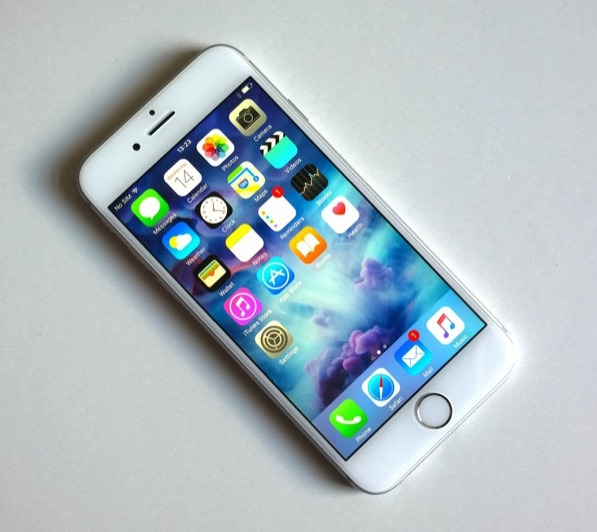
Apple recently released the iOS 11.2.2 update containing security patches for Meltdown and Spectre — two major CPU vulnerabilities that were revealed to the public at the beginning of this year. Apple had confirmed that all its devices are affected by Meltdown and Spectre and that it had already rolled out partial fixes for them.
Unlike other vulnerabilities, patching Meltdown and Spectre can lead to a performance hit due to the nature of the bug. In its official statement, Apple did not talk anything about a decline in performance but if you have been following the vulnerabilities closely and the industry response to them, you’d know that a performance hit was inevitable. With the recently released iOS 11.2.2 update, Apple introduced further security patches for Spectre.
Now, an iPhone 6 owner decided to run some benchmarks to see how the performance of his handset was affected by the Spectre patch from Apple. Melvin Mughal ran the same series of benchmarks on his iPhone 6 while running iOS 11.1.2 and then with iOS 11.2.2 installed. The former version of the OS does not contain any patches for Spectre.
Interestingly, the results show a staggering difference in performance across the board. In single-core benchmarks, the iPhone 6 saw its score drop by 41 percent, while the multi-core score reduced by 39 percent.
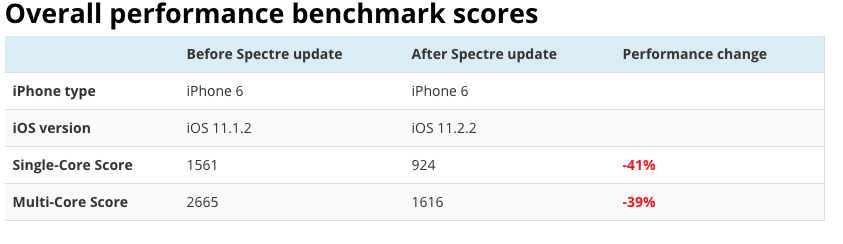
In certain benchmarks, the iPhone 6 reported up to 50 percent decline in scores. This is a fairly significant performance hit that will be easily visible to iPhone 6 owners in daily use.
All numbers point to the same conclusion: it took a serious hit in performance at every possible level. A lot of benchmark levels show a significant decrease in performance on the iPhone 6 up to 50% on some benchmark levels. Although this is not the best news, this security update is a ‘necessary evil’. It demonstrates a message the security community have reminded us time and time again: security can’t be compromised over performance.
Some have fairly pointed out the results could be influenced by the battery throttling that was exposed last month and confirmed by Apple. That may be a technical correct argument (which has not been proven by vendor benchmark numbers correlated with the Spectre patch). Several other users and reporters mentioned fluctuating benchmarks with some showing no loss of performance but others did (which were already throttled, so Spectre specific).
Before you get all worked up about the decline in performance, I will recommend you to wait for more benchmark results to pop up to see the full impact of performance the update has on your iPhone’s performance. It is also possible that real-life performance will see a far smaller decline than what benchmarks report.
Nonetheless, whatever the issue might be, you should not hold back on installing the iOS 11.2.2 update on your iPhone since it contains fixes for a major security vulnerability.
Source: iphonehacks










