 NEWS
NEWS
Apple Announces Q2 2018 Revenue of $61.1 Billion
 05/04/2018
 2778
2778
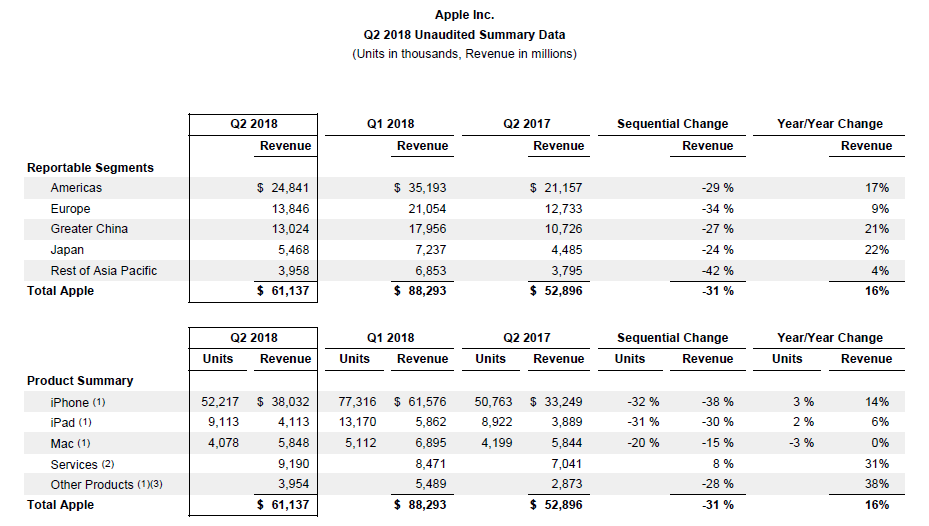
Happy Apple Earnings Day! Apple has just announced its Q2 2018 results with $61.1 billion in revenue and $13.8 billion in profit earned from selling 52.2 million iPhones, 9.1 million iPads, and 4.07 million Macs. Apple had offered revenue guidance between $60 billion and $62 billion.
That compares to $52.9b in revenue, $11.03 billion profit, 50.7 million iPhones, 8.92 million iPads, and 4.19 million Macs sold the same quarter a year ago; and $88.3 billion in revenue, $20.1 billion in profit, 77.3 million iPhones, 13.2 million iPads, and 5.1 million Macs sold during the previous quarter.
Apple projects revenue between $51.5 billion and $53.5 billion for 2018 Q3. Full press release after the break, and stick around for our earnings call live blog at the top of the hour:
Tim Cook:
We’re thrilled to report our best March quarter ever, with strong revenue growth in iPhone, Services and Wearables,” said Tim Cook, Apple’s CEO. “Customers chose iPhone X more than any other iPhone each week in the March quarter, just as they did following its launch in the December quarter. We also grew revenue in all of our geographic segments, with over 20% growth in Greater China and Japan.”
Luca Maestri:
“Our business performed extremely well during the March quarter, as we grew earnings per share by 30 percent and generated over $15 billion in operating cash flow,” said Luca Maestri, Apple’s CFO. “With the greater flexibility we now have from access to our global cash, we can more efficiently invest in our US operations and work toward a more optimal capital structure. Given our confidence in Apple’s future, we are very happy to announce that our Board has approved a new $100 billion share repurchase authorization and a 16 percent increase in our quarterly dividend.”
For additional information visit Apple Newsroom (www.apple.com/newsroom), or call Apple’s Media Helpline at (408) 974-2042.










