 NEWS
NEWS
Rumor: New iPhones may be First to Bundle USB-C Fast Charging
 05/03/2018
 2667
2667
Apple's 2018 iPhone lineup could ship with new USB-C power adapters that come with USB-C to Lightning cables for faster charging, according to a post on Chinese social network Weibo that cites supply chain sources.
Apple is said to be planning to upgrade to USB-C support for all of its devices, shipping next-generation iPhones with a redesigned 18W power adapter that allows for USB-C fast charging with an included USB-C to Lightning cable. 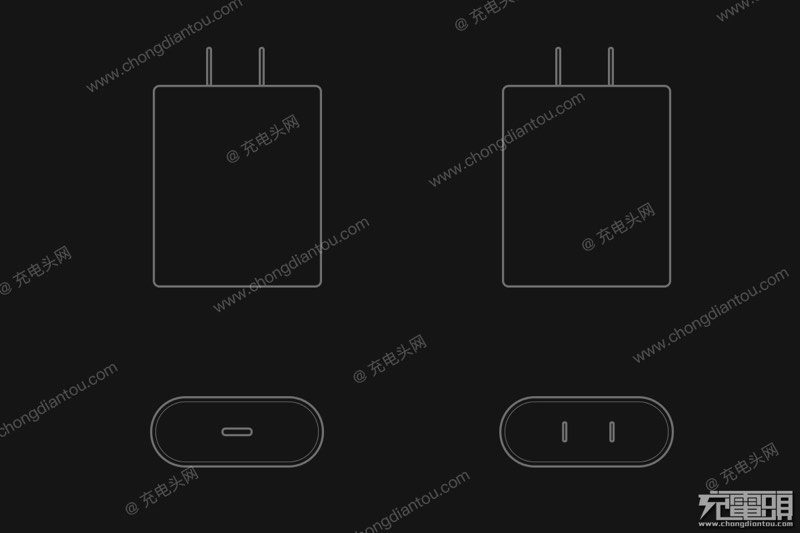
We're not able to verify this rumor as it comes from a source without a track record for accurate reporting, but switching to USB-C power adapters across the iPhone and iPad lineup would make some sense as Apple's Mac lineup has largely transitioned to USB-C.
An 18W USB-C power adapter would enable fast charging speeds that would allow the iPhone to charge from 0 to 50% in approximately 30 minutes.
This kind of fast charging functionality is available for the iPhone 8, iPhone 8 Plus, iPhone X, and iPad Pro models, but at the current time, it requires customers to use a USB-C MacBook power adapter (minimum price $49) or a third-party USB-C power adapter ($15+) paired with a Lightning to USB-C cable, which is priced at $25 and only available as a standalone accessory.
Current iPhone models ship with a 5W power adapter that works with a USB-A to Lightning cable, so an upgrade to an 18W adapter would be a huge change. Presumably, the same changes will be implemented in upcoming iPad Pro models if the rumor is true, with Apple also upgrading the existing 12W USB-A iPad Pro power adapter to an 18W USB-C power adapter.
When using fast charging functionality over USB-C with a USB-C to Lightning cable, maximum charging speeds are achieved on an iPad or iPhone at approximately 18W, as we discovered in a detailed iPhone X charging speed test we performed late last year.
An included USB-C power adapter and USB-C to Lightning cable that supports fast charging would be a huge gain for iPhone users. Such charging speeds promise 50% battery in 30 minutes and can deliver an 80% charge (from zero) in approximately an hour. Many competing Android devices already support fast charging without the need for customers to purchase additional accessories.
Today's report suggests the design of the charger that ships with the iPhone will see an overhaul, going from the traditional square shape used in the U.S. to something more akin to an oval. As mentioned above, it will reportedly include a USB-C to Lightning cable.
Right now, Apple does not allow third-party companies to make USB-C to Lightning cables, and the Weibo report indicates USB-C to Lightning cables will continue to be proprietary technology until 2019, when Apple may open up the standard to allow its MFi partners to manufacture the cables.
Source: macrumors










