NEWS

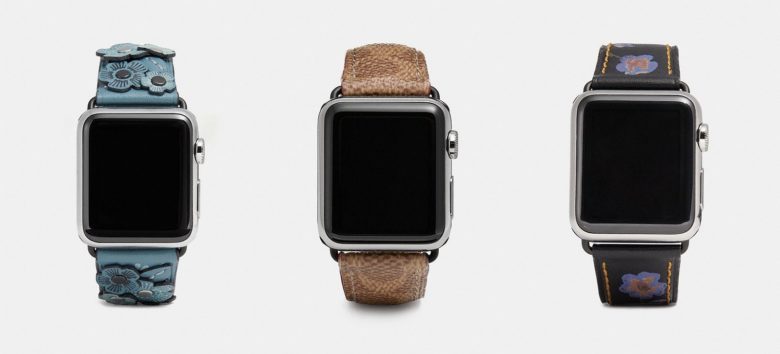
Coach Introduces new Apple Watch Bands for Summer

05/22/2018

2435

Coach Introduces new Apple Watch Bands for Summer


Luxury design company Coach is ready to supply Apple Watch wearers with a fresh lineup of new bands this summer.


The company unveiled its latest lineup of fashionable bands that include a couple new colors and fabrics for those who are looking to add a little extra style to their wrists.


Coach’s new bands were released today on its online store and retail locations. According to Hautee Criture, the new bands include Strap with Heart Appliqué in Dusty Rose, the Strap in Signature Canvas in Kahki and the Apple Watch Strap in Saddle.


Pricing on the new bands is between $150 – $175. New colors include light blue, black with blue flowers and denim. The bands are compatible with all versions of the Apple Watch, depending on which size you get. Some of the colors are limited to the 38mm and 42mm versions of the watch.


Most of the bands created by Coach are produced in a limited number and are available while supplies last. It appears that some of the company’s limited edition Spring straps are still for sale too.


Source: cult of mac

Windows
Mac OS
iOS
Linux
3uTools
Win 64-bit For this device
V9.01 2025-12-27
Download
Win 32-bit For this device
V9.01 2025-12-27
Download
3uTools
Intel Chip How to Identify Chip Type
V9.01 2025-12-31
Download
Apple Silicon
V9.01 2025-12-31
Download
How to Identify Chip Type
1.  Click the Apple icon in the top-left corner of the screen and select About This Mac.
2.  Check the Processor or Chip field to determine if it is "Intel" or "Apple".
Please use the 3uTools PC client to install the iOS client:
1、 Install either the Windows or Mac version of 3uTools on your computer
2、 Open the PC client and connect your device to the computer via USB cable
3、 After the connection is successful, wait for the computer to automatically install the mobile app for the device, or locate “Install Mobile App” on the computer and manually click to install.
3uTools
deb file
V3.01 2025-11-20
Download
rpm file
V3.01 2025-11-20
Download
Windows
Windows
iOS
iOS
Android
Android
TV
TV
3uAirPlayer
Win 64-bit For this device
V6.0.2 2025-11-19
Download
Win 32-bit For this device
V6.0.2 2025-11-19
Download
iOS Device Mirroring (No App Required)
1、 Install 3uAirPlayer on the Windows PC
2、 Open Control Center and select Screen Mirroring
3、 From the list, choose your PC to start mirroring
4、 Or connect your iOS device to the PC via USB to begin mirroring
Scan to get "3uAirPlayer" App
3uAirPlayer TV V1.0.18
2025-11-28
TV System Requirements: Android 7.0 or later
Download the TV installation package, copy it to a USB drive, insert it into your TV or set-top box, then select the file from the home screen to install.