
NEWS

The ex-Apple Superstar is Leaving Uber After a Year

06/12/2018

2769

Bozoma Saint John, a former Apple marketing exec hired to fix Uber's brand, is leaving the company. She'll become CMO of Endeavor, the parent company of famed Hollywood talent agency WME.


Bozoma Saint John, a marketing expert who was hired by ousted CEO Travis Kalanick to help fix Uber's brand, is leaving the company after a little more than a year, Recode first reported Monday.

The ex-Apple Superstar is Leaving Uber After a Year


Uber confirmed to Business Insider that Saint John is leaving. Saint John is leaving to become CMO of Endeavor, the parent company of famed Hollywood talent agency WME, which represents stars such as Amy Adams, Oprah, and Matt Damon.


"Boz joined Uber at a time when the company was hurting — but her energy, optimism and creativity have been a key part of our ongoing turnaround. Endeavor is lucky to have her, and I'm excited to watch her work in her new role," CEO Dara Khosrowshahi said in a statement.


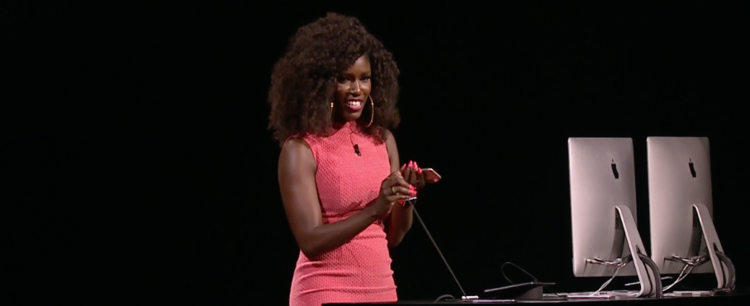
Saint John is best known as the stylish ex-Apple Music exec who stole the show with her high-energy presentation at the iPhone maker's annual WWDC conference in 2016. She went to Uber in 2017, right as the company hit a string of scandals that tarnished Uber's brand and led to the resignation of its CEO Travis Kalanick.


During her time at Uber, Saint John took steps to improve the company's image with both drivers and customers, going so far as to drive for the service personally.


Source: BI

Windows
Mac OS
iOS
Linux
3uTools
Win 64-bit For this device
V9.01 2025-12-27
Download
Win 32-bit For this device
V9.01 2025-12-27
Download
3uTools
Intel Chip How to Identify Chip Type
V9.01 2025-12-31
Download
Apple Silicon
V9.01 2025-12-31
Download
How to Identify Chip Type
1.  Click the Apple icon in the top-left corner of the screen and select About This Mac.
2.  Check the Processor or Chip field to determine if it is "Intel" or "Apple".
Please use the 3uTools PC client to install the iOS client:
1、 Install either the Windows or Mac version of 3uTools on your computer
2、 Open the PC client and connect your device to the computer via USB cable
3、 After the connection is successful, wait for the computer to automatically install the mobile app for the device, or locate “Install Mobile App” on the computer and manually click to install.
3uTools
deb file
V3.01 2025-11-20
Download
rpm file
V3.01 2025-11-20
Download
Windows
Windows
iOS
iOS
Android
Android
TV
TV
3uAirPlayer
Win 64-bit For this device
V6.0.2 2025-11-19
Download
Win 32-bit For this device
V6.0.2 2025-11-19
Download
iOS Device Mirroring (No App Required)
1、 Install 3uAirPlayer on the Windows PC
2、 Open Control Center and select Screen Mirroring
3、 From the list, choose your PC to start mirroring
4、 Or connect your iOS device to the PC via USB to begin mirroring
Scan to get "3uAirPlayer" App
3uAirPlayer TV V1.0.18
2025-11-28
TV System Requirements: Android 7.0 or later
Download the TV installation package, copy it to a USB drive, insert it into your TV or set-top box, then select the file from the home screen to install.




