 NEWS
NEWS
Gang of Thieves Snatches $19,000 of iPhones from Apple Store
 07/10/2018
 2650
2650
A group of hooded thieves snatched $19,000 worth of iPhones from a New York Apple Store late last week.
Five men were recorded on CCTV during the raid at the store in Huntington Station, NY. Police are offering $5,000 for any information that will allow them to apprehend the criminals.
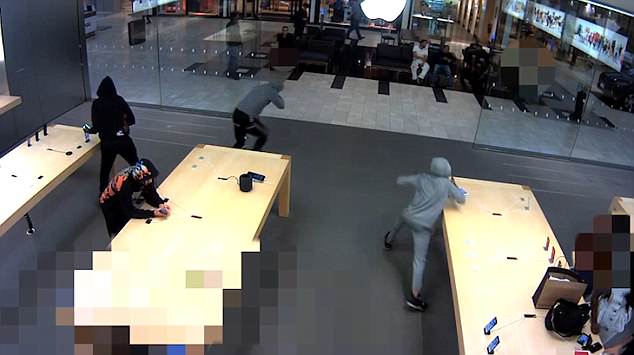
The raid began as the five men walked into the store and began casually browsing for a couple of minutes. Soon after this, they began tearing 21 iPhone 8 and iPhone X handsets from their counters, prior to fleeing the scene. The incident took place at 8.20pm on Friday.
“Suffolk County Crime Stoppers and Suffolk County Police Second Squad detectives are seeking the public's help to identify and locate the people who stole merchandise from a Huntington Station store earlier this month,” police said in a statement. “The men grabbed the phones off a display table and ran from the store. The men were all wearing hooded sweatshirts.”
Anyone with information about the incident can contact Suffolk County Crime Stoppers to submit an anonymous tip. This can be done by calling 1-800-220-TIPS, texting “SCPD” and a message to “CRIMES” (274637), or via the website www.tipsubmit.com. All calls, text messages and emails will be kept confidential.
Security footage of the incident was shared by the Daily Mail.
Unfortunately, Apple Stores are frequently targeted by criminals. The most significant theft of Apple devices took place in 2012 when $1.5 million worth of iPad minis were stolen from New York’s JFK airport.
Another notable theft involved the 2015 charging of four former Apple Store employees who carried out a scam worth $700,000, using ill-gotten Apple gift cards.
Source: cultofmac










