 NEWS
NEWS
The Tech World’s Solution to Menstrual Awareness is This Period Emoji
 08/30/2018
 3439
3439
Every year, we get more and more emoji added to our iPhones and Android phones. They’re more diverse and politically correct than ever, and that’s not a bad thing. That’s why a period emoji, no matter how uncomfortable it may sound to some people, is a good idea.
It’ll be a while before any of the proposed images ever make into your emoji keyboard, but charities including Plan International UK and Plan Australia are already working on a campaign to create the emoji.
Amazon’s Fire TV Stick was just discounted for the first time since Prime Day Per The Next Web, Plan International UK researched the matter, discovering that half of the British women aged 18-34 surveyed think that a period emoji would make it easier for them to take about their periods to friends and partners. It may be 2018, but certain topics are still very taboo.
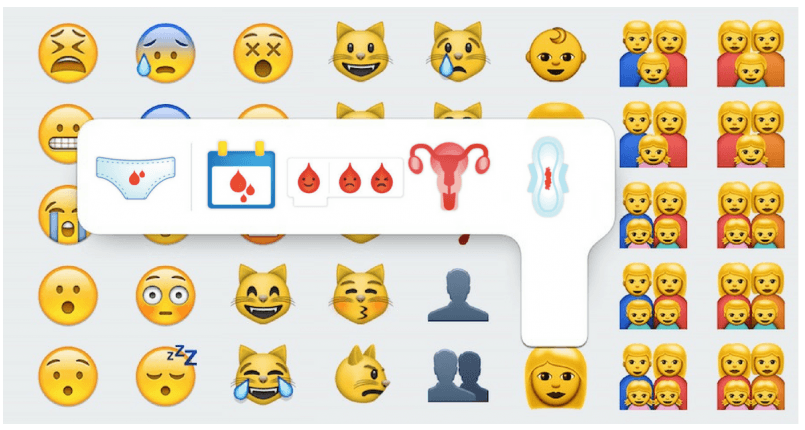
Plan International also found that 90% of girls in rural Ghana feel ashamed during their period, while 28% of girls in Uganda skip school during it.
An emoji would not solve these problems, but the campaign’s purpose isn’t to only support the creation of a period emoji, but also to raise awareness and money to help the women around the world who don’t have access to menstrual products.
The charity created the five emoji designs above and wanted the public to decide which ones they should pitch to the Unicode Consortium, the body that governs the launch of new emoji. The period pants were the most voted, but the Consortium rejected it.
That doesn’t mean the fight is over, however, and Plan International wants to resubmit a more PG version of the period, seen above.
Source: bgr










