
NEWS

Here’s Why your iPhone is a Much Better Buy than Android Phones

09/04/2018

3417

With new iPhones and Pixel phones on the horizon, this could be your last chance to flog your old blower for cash before its value plummets.


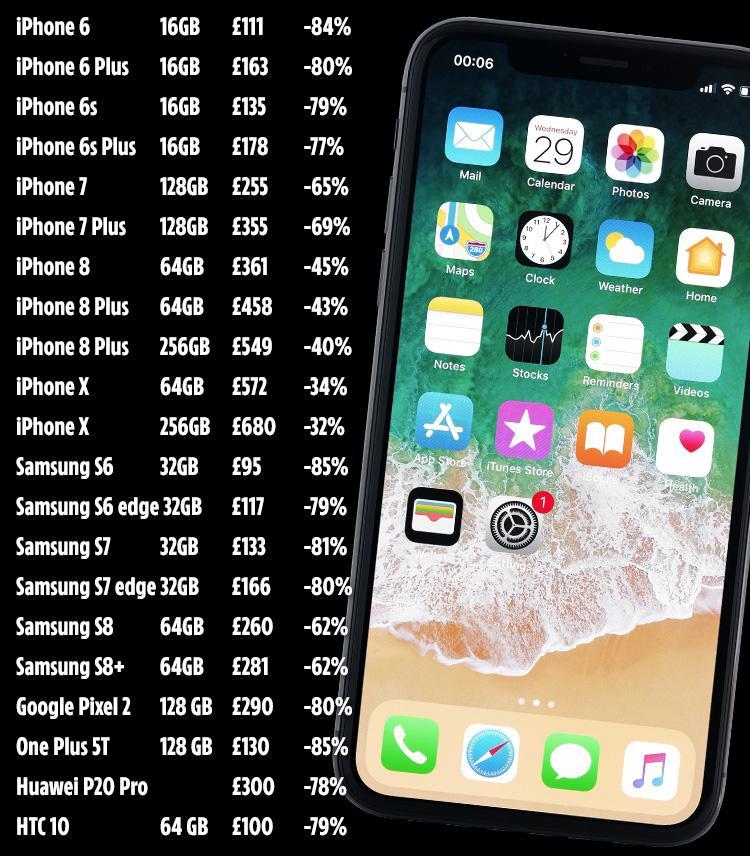
And Apple's 2017 handsets can net you the most dosh for trade-ins right now, beating out Android phones by a mile, according to a new MusicMagpie study.


At the top of the list is the 256GB iPhone X, which gets you £680 – or around 68 percent of its value.


That makes its depreciation rate better than any iPhone in recent memory, including the iPhone 6 and 7, both of which only held an average of 40 percent after a year.


In second place is the 256GB iPhone 8 Plus, worth £549 second-hand – that's 57 percent of its value.


Another recent study backs up the data by showing that a used iPhone X sells for around 85 percent of its brand-new price, according to B-Stock, a company that helps businesses "liquidate" their excess phone stock.

Here’s Why your iPhone is a Much Better Buy than Android Phones


That's "substantially higher" than older iPhone models, according to the firm.


Android handsets, meanwhile, are taking a beating. The latest Samsung models are your best bet for trade-ins, with the Galaxy S9 Plus losing 50 percent of its £869 value in just five months.


Meanwhile the Google Pixel 2 fared even worse, losing a staggering 80 percent of its origial £629 value.


MusicMagpie claims you can get 25 percent more for smartphone trade-ins now in comparison to after a new model launches.


Source: the sun

Windows
Mac OS
iOS
Linux
3uTools
Win 64-bit For this device
V9.01 2025-12-27
Download
Win 32-bit For this device
V9.01 2025-12-27
Download
3uTools
Intel Chip How to Identify Chip Type
V9.01 2025-12-31
Download
Apple Silicon
V9.01 2025-12-31
Download
How to Identify Chip Type
1.  Click the Apple icon in the top-left corner of the screen and select About This Mac.
2.  Check the Processor or Chip field to determine if it is "Intel" or "Apple".
Please use the 3uTools PC client to install the iOS client:
1、 Install either the Windows or Mac version of 3uTools on your computer
2、 Open the PC client and connect your device to the computer via USB cable
3、 After the connection is successful, wait for the computer to automatically install the mobile app for the device, or locate “Install Mobile App” on the computer and manually click to install.
3uTools
deb file
V3.01 2025-11-20
Download
rpm file
V3.01 2025-11-20
Download
Windows
Windows
iOS
iOS
Android
Android
TV
TV
3uAirPlayer
Win 64-bit For this device
V6.0.2 2025-11-19
Download
Win 32-bit For this device
V6.0.2 2025-11-19
Download
iOS Device Mirroring (No App Required)
1、 Install 3uAirPlayer on the Windows PC
2、 Open Control Center and select Screen Mirroring
3、 From the list, choose your PC to start mirroring
4、 Or connect your iOS device to the PC via USB to begin mirroring
Scan to get "3uAirPlayer" App
3uAirPlayer TV V1.0.18
2025-11-28
TV System Requirements: Android 7.0 or later
Download the TV installation package, copy it to a USB drive, insert it into your TV or set-top box, then select the file from the home screen to install.




