 NEWS
NEWS
According to Italian Courier iPhone XS' and 'iPhone XC' Will Ship on Sept. 21
 09/11/2018
 2931
2931
Apple could start to distribute smartphones set to be unveiled on Wednesday not long after the announcement, with a report suggesting the first batch of "iPhone XS" and "iPhone XC" models could ship to customers as early as September 21 in Italy.
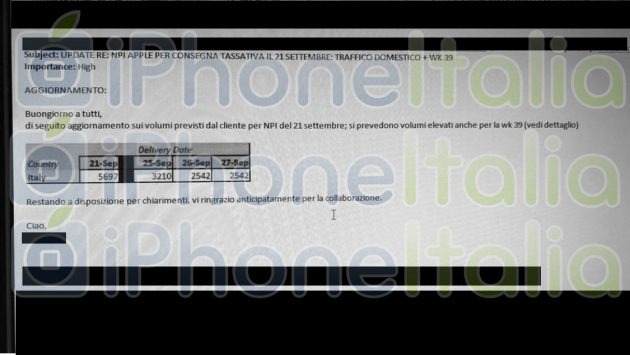
A screenshot of an Italian shipper's internal messaging system reportedly warns its employees to anticipate higher workloads in the near future. The image, obtained by iPhone Italia, appears to indicate the first high-traffic day to be September 21, just nine days after Apple's event.
AppleInsider has confirmed the carrier, and it is Apple's shipping partner in Italy, and a host of other countries.
The message also warns that there will be increased deliveries on September 25 through to September 27, but not as high as the initial wave planned for September 21.
While the message does not specify what will be delivered on those days, the subject line does mention Apple by name, indicating the increases are linked to the company's announcements. It also does not advise for higher-than-normal deliveries before September 21, which may be an indicator of when iPhone deliveries are to commence.
There is also no mention of deliveries before September 21, which suggests those days are expected to have normal delivery levels.
While the internal email relates to Italy, it could also be an indicator for when the new models will ship in other markets. Since Italy is typically among the first markets to receive shipments of Apple products after launch, it is likely for the new iPhones to be made available on the same date in the United States and areas of Europe.
Apple's "Gather Round" event on Sept. 12 is expected to see the launch of three new iPhones, as well as potential changes for the Apple Watch, iPad Pro, and Mac lines.
Source: appleinsider










