
NEWS

Woodside May Sell the Remaining Artifacts From Steve Jobs' One-time Home

10/22/2018

2997

Steve Jobs hated the historic Jackling House that he bought in 1984 so much that he spent a tremendous amount of time and energy in his final years trying to have the Woodside mansion torn down.


Woodside May Sell the Remaining Artifacts From Steve Jobs' One-time Home


After a decade of controversy and legal fights with local preservation groups, Jobs won, and the 17,250-square-foot building was demolished in February 2011 to make way for a new home.


Jobs’ determination to raze the house was particularly notable because he died from pancreatic cancer just eight months after the demolition. While the extent of his health problems were not well known when the Jackling House was being bulldozed, in retrospect, Jobs must have realized it was unlikely he would live to see anything else built on that land.
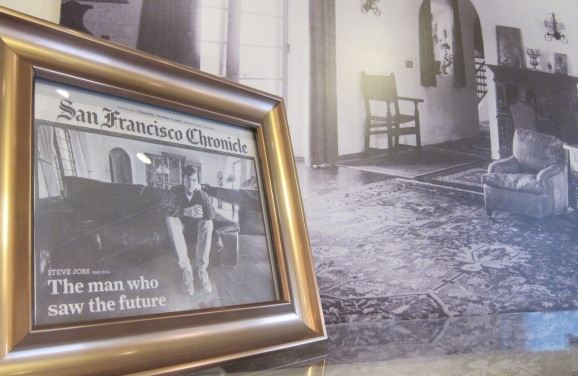

Woodside May Sell the Remaining Artifacts From Steve Jobs' One-time Home


So the demolition of the house was one of the last victories of Jobs’ life. In the coming years, it will be replaced by a new 15,000 square foot estate proposed by his wife, Laurene Powell Jobs, and moving toward approval by the Town of Woodside.


But it wasn’t quite the end of the story for the Jackling House. Rather than erasing its existence completely, tearing the house down has scattered many of its remains. While preservationists lost the war to save the house, they continue to fight to maintain the memories and some of physical souvenirs of what they have collectively taken to calling “The House That Steve Jobs Hated.”


Source: vb

Windows
Mac OS
iOS
Linux
3uTools
Win 64-bit For this device
V9.01 2025-12-27
Download
Win 32-bit For this device
V9.01 2025-12-27
Download
3uTools
Intel Chip How to Identify Chip Type
V9.01 2025-12-31
Download
Apple Silicon
V9.01 2025-12-31
Download
How to Identify Chip Type
1.  Click the Apple icon in the top-left corner of the screen and select About This Mac.
2.  Check the Processor or Chip field to determine if it is "Intel" or "Apple".
Please use the 3uTools PC client to install the iOS client:
1、 Install either the Windows or Mac version of 3uTools on your computer
2、 Open the PC client and connect your device to the computer via USB cable
3、 After the connection is successful, wait for the computer to automatically install the mobile app for the device, or locate “Install Mobile App” on the computer and manually click to install.
3uTools
deb file
V3.01 2025-11-20
Download
rpm file
V3.01 2025-11-20
Download
Windows
Windows
iOS
iOS
Android
Android
TV
TV
3uAirPlayer
Win 64-bit For this device
V6.0.2 2025-11-19
Download
Win 32-bit For this device
V6.0.2 2025-11-19
Download
iOS Device Mirroring (No App Required)
1、 Install 3uAirPlayer on the Windows PC
2、 Open Control Center and select Screen Mirroring
3、 From the list, choose your PC to start mirroring
4、 Or connect your iOS device to the PC via USB to begin mirroring
Scan to get "3uAirPlayer" App
3uAirPlayer TV V1.0.18
2025-11-28
TV System Requirements: Android 7.0 or later
Download the TV installation package, copy it to a USB drive, insert it into your TV or set-top box, then select the file from the home screen to install.




