
NEWS

Emoji 12 is More Likely Coming to iOS 13

10/24/2018

2616

As Apple prepares to ship its 2018 emoji update with iOS 12.1, work on upcoming emojis slated for 2019 continues. Today, Emojipedia is previewing its current progress with the upcoming emoji 12 revision.


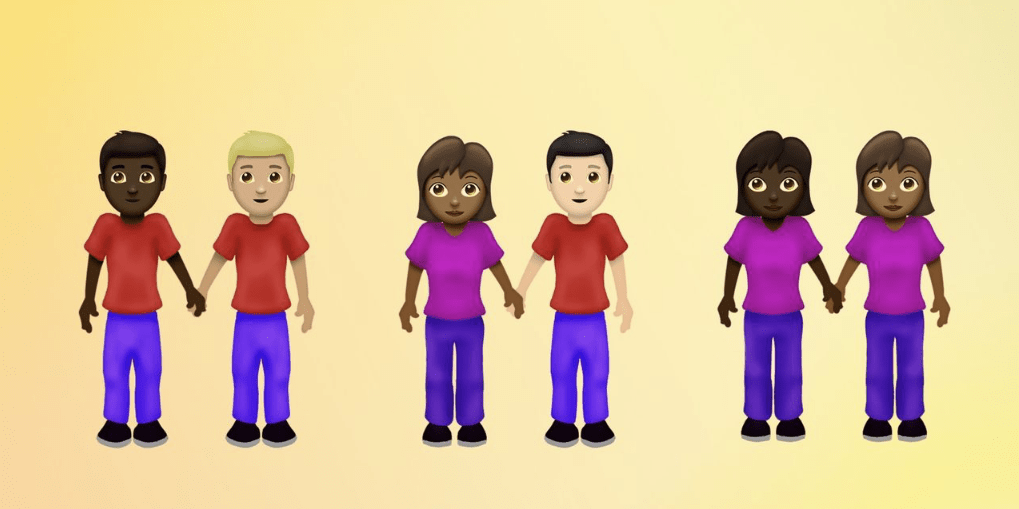
The firm says that this release will focus more on including gender and skin tone combinations, an area in which has become really complex over the past several emoji releases. We’re also seeing new emojis such as a new white heart, kite, sloth, and flamingo.


Apple-proposed accessibility emojis such as wheelchairs, service dogs, and mechanical arms and legs are also said to be released with the upcoming Emoji 12.0 updates, but Emojipedia is quick to note that they’re still in the early stages of developing the emojis and that any previews or mentions are not guaranteed to be released.

Emoji 12 is More Likely Coming to iOS 13


Google has also proposed some ideas regarding skin tone support for the handshake and wrestler emojis, which will be added with this release. Unlike Apple’s proposals, some vendors such as Facebook and Google are already using this updated emojis.


More expansive skin tone support will expand to family emojis as well, which will now have support for black skin tones.


Emoji 12.0 is looking to be finalized by the Unicode Technical Committee in January of 2019, with a scheduled release date of March.


If previous revisions are any indication, Apple will likely roll out support for the new emoji in a point release with iOS 13.


Source: 9to5mac


Windows
Mac OS
iOS
Linux
3uTools
Win 64-bit For this device
V9.01 2025-12-27
Download
Win 32-bit For this device
V9.01 2025-12-27
Download
3uTools
Intel Chip How to Identify Chip Type
V9.01 2025-12-31
Download
Apple Silicon
V9.01 2025-12-31
Download
How to Identify Chip Type
1.  Click the Apple icon in the top-left corner of the screen and select About This Mac.
2.  Check the Processor or Chip field to determine if it is "Intel" or "Apple".
Please use the 3uTools PC client to install the iOS client:
1、 Install either the Windows or Mac version of 3uTools on your computer
2、 Open the PC client and connect your device to the computer via USB cable
3、 After the connection is successful, wait for the computer to automatically install the mobile app for the device, or locate “Install Mobile App” on the computer and manually click to install.
3uTools
deb file
V3.01 2025-11-20
Download
rpm file
V3.01 2025-11-20
Download
Windows
Windows
iOS
iOS
Android
Android
TV
TV
3uAirPlayer
Win 64-bit For this device
V6.0.2 2025-11-19
Download
Win 32-bit For this device
V6.0.2 2025-11-19
Download
iOS Device Mirroring (No App Required)
1、 Install 3uAirPlayer on the Windows PC
2、 Open Control Center and select Screen Mirroring
3、 From the list, choose your PC to start mirroring
4、 Or connect your iOS device to the PC via USB to begin mirroring
Scan to get "3uAirPlayer" App
3uAirPlayer TV V1.0.18
2025-11-28
TV System Requirements: Android 7.0 or later
Download the TV installation package, copy it to a USB drive, insert it into your TV or set-top box, then select the file from the home screen to install.




