 NEWS
NEWS
Samsung Brand Ambassador Sued for $1.6 Million for Using iPhone X in Public
 10/25/2018
 3074
3074
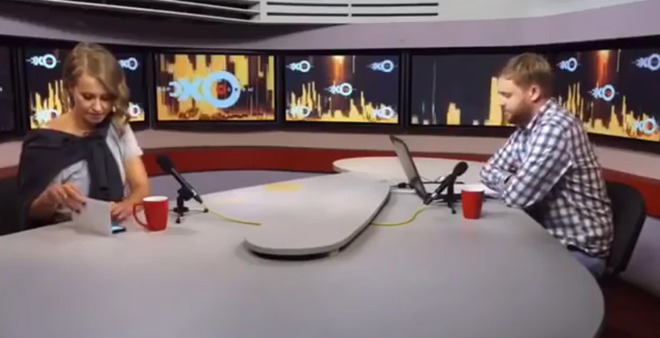
Ksenia Sobchak was hired by Samsung to market its smartphones in the country, with the Russian TV presenter, journalist, and politician contracted to use the smartphones in public. Under the terms of similar agreements between companies and influential people, they are not typically allowed to be seen using competing products in public, a rule that Sobchak broke.
According to The Mirror, Sobchak was spotted using an iPhone X during a television interview, with the personality attempting to hide the Apple smartphone under a piece of paper while the cameras were on. Sobchak is also said to have used the iPhone X during social events in Moscow and other TV appearances, again against the contract's rules.
Formerly dubbed the "Russian Paris Hilton," Sobchak is also rumored to be the goddaughter to President Vladimir Putin, who she ran against in elections earlier in 2018. Anatoly Sobchak, her father, was the first elected mayor of St Petersburg, and thought to have been a mentor to the president.
The numerous sightings has led to Samsung suing Sobchak for a reported 108 million rubles (approximately $1.6 million) for breach of contract. It is unknown how much Sobchak was originally paid by Samsung, but it is likely the suit's claimed damages are far higher in value, including penalties for breaking the agreement.
Neither representatives of Sobchak nor Samsung have publicly commented on the affair.
The practice of paying influencers to use products is common, with social media posts by celebrities and other personalities marketing the items, both directly and indirectly through observed usage. In the case of smartphones and other Internet-connected devices, spotting influencers using the "wrong" phone on social media is a major marketing gaffe, one that crops up quite frequently online.
In 2014, Maroon 5 singer Adam Levine promoted the launch of Samsung's Milk Music service, including the suggestion of holding an "iPhone burning," but one week later he was caught promoting a TV appearance from an iPhone. Levine was also due to perform at the iTunes Festival at that time.
Tennis player David Ferrer sent a tweet to his followers promoting the Galaxy S4 in 2013, but the message was labeled as "via Twitter for iPhone." In 2015, BlackBerry's PR team sent a tweet promoting the BlackBerry Classic from an iPhone, mirroring a similar mistake made by one-time creative director Alicia Keys in 2013.
More recently, "Wonder Woman" star Gal Gadot dispatched a tweet to followers in April endorsing the Huawei Mate 10 Pro, with the tweet again revealed to be sent from an iPhone. The tweet was removed and replaced by other marketing messages, with one of the star's staffers blamed for the mixu.
Source: appleinsider










