NEWS

Apple Store Adds 10% Discount for Vets and Military

12/04/2018

2866

Apple Store Adds 10% Discount for Vets and Military


Buying a new iPhone XS just got a lot more affordable for anyone that has served is or is currently surviving in the U.S. Military.


Apple revealed today that it has launched a new website that gives a 10% discount to vets and active military members that the company says is an expression of its gratitude for service.


The new subsite is similar to the education store that offers discounts to students and teachers. Just like the education store, the military and vets site doesn’t ask for verification so it’s all based on the honor system.


“At Apple we are deeply grateful to the men and women of our armed forces,” Apple said in a statement to TechCrunch. “We’re proud to offer active military and veterans a new dedicated online store with special pricing as an expression of our gratitude for their brave service.”


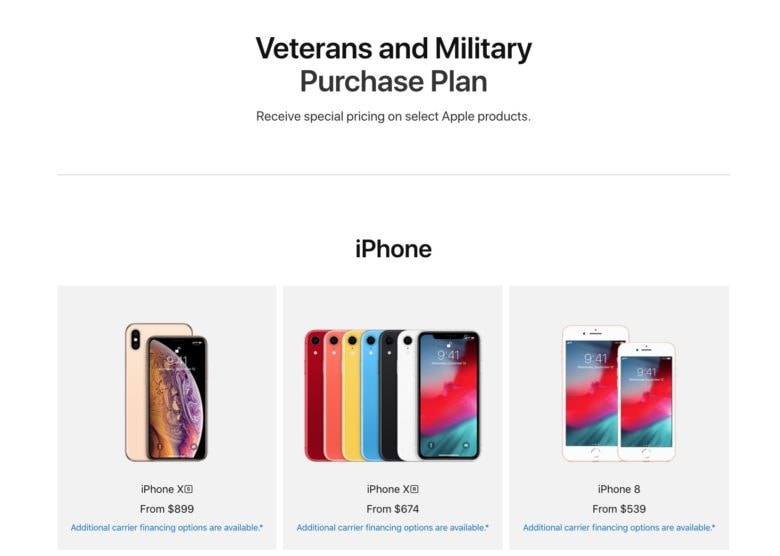
The iPhone XS is $100 cheaper on the military site at $899. Apple dropped the iPhone XR pricetag from $749 to $674. The iPhone 8 and iPhone 7 are also offered at a discounted price, but the iPhone XS Max doesn’t get a price drop.


There are also discounts available on the Mac, Apple Watch, iPad, HomePod, Apple TV 4K, HomePod and some accessories. Most of the discounts are better than the ones found on Apple’s educational store.


Source: cult of mac

Windows
Mac OS
iOS
Linux
3uTools
Win 64-bit For this device
V9.01 2025-12-27
Download
Win 32-bit For this device
V9.01 2025-12-27
Download
3uTools
Intel Chip How to Identify Chip Type
V9.01 2025-12-31
Download
Apple Silicon
V9.01 2025-12-31
Download
How to Identify Chip Type
1.  Click the Apple icon in the top-left corner of the screen and select About This Mac.
2.  Check the Processor or Chip field to determine if it is "Intel" or "Apple".
Please use the 3uTools PC client to install the iOS client:
1、 Install either the Windows or Mac version of 3uTools on your computer
2、 Open the PC client and connect your device to the computer via USB cable
3、 After the connection is successful, wait for the computer to automatically install the mobile app for the device, or locate “Install Mobile App” on the computer and manually click to install.
3uTools
deb file
V3.01 2025-11-20
Download
rpm file
V3.01 2025-11-20
Download
Windows
Windows
iOS
iOS
Android
Android
TV
TV
3uAirPlayer
Win 64-bit For this device
V6.0.2 2025-11-19
Download
Win 32-bit For this device
V6.0.2 2025-11-19
Download
iOS Device Mirroring (No App Required)
1、 Install 3uAirPlayer on the Windows PC
2、 Open Control Center and select Screen Mirroring
3、 From the list, choose your PC to start mirroring
4、 Or connect your iOS device to the PC via USB to begin mirroring
Scan to get "3uAirPlayer" App
3uAirPlayer TV V1.0.18
2025-11-28
TV System Requirements: Android 7.0 or later
Download the TV installation package, copy it to a USB drive, insert it into your TV or set-top box, then select the file from the home screen to install.