 NEWS
NEWS
Data Shows iPhone XS & XR Adoption Significantly Lower Than Last Year’s Models
 12/10/2018
 2734
2734
Analytics company Mixpanel has become a reliable source of iOS adoption information, but its tools also allow for tracking of iPhone model adoption. There’s been a lot of news about slowing iPhone sales, and Mixpanel’s data offers some interesting insight on that speculation.
The company’s data comes from analytics frameworks inside apps and mobile websites, which are able to view iPhone model numbers and other details.
According to the Mixpanel data, the iPhone XR is, in fact, the best-selling iPhone model each week, echoing what Apple VP Greg Joswiak said last month. This is judged by comparing the increase in iPhone XR adoption on a week-by-week basis with the iPhone XS and iPhone XS Max adoption numbers. The iPhone XR doesn’t lead by a wide margin, and there are individual days where it’s outsold by the iPhone XS or XS Max, but on a week-by-week basis, it pulls ahead.
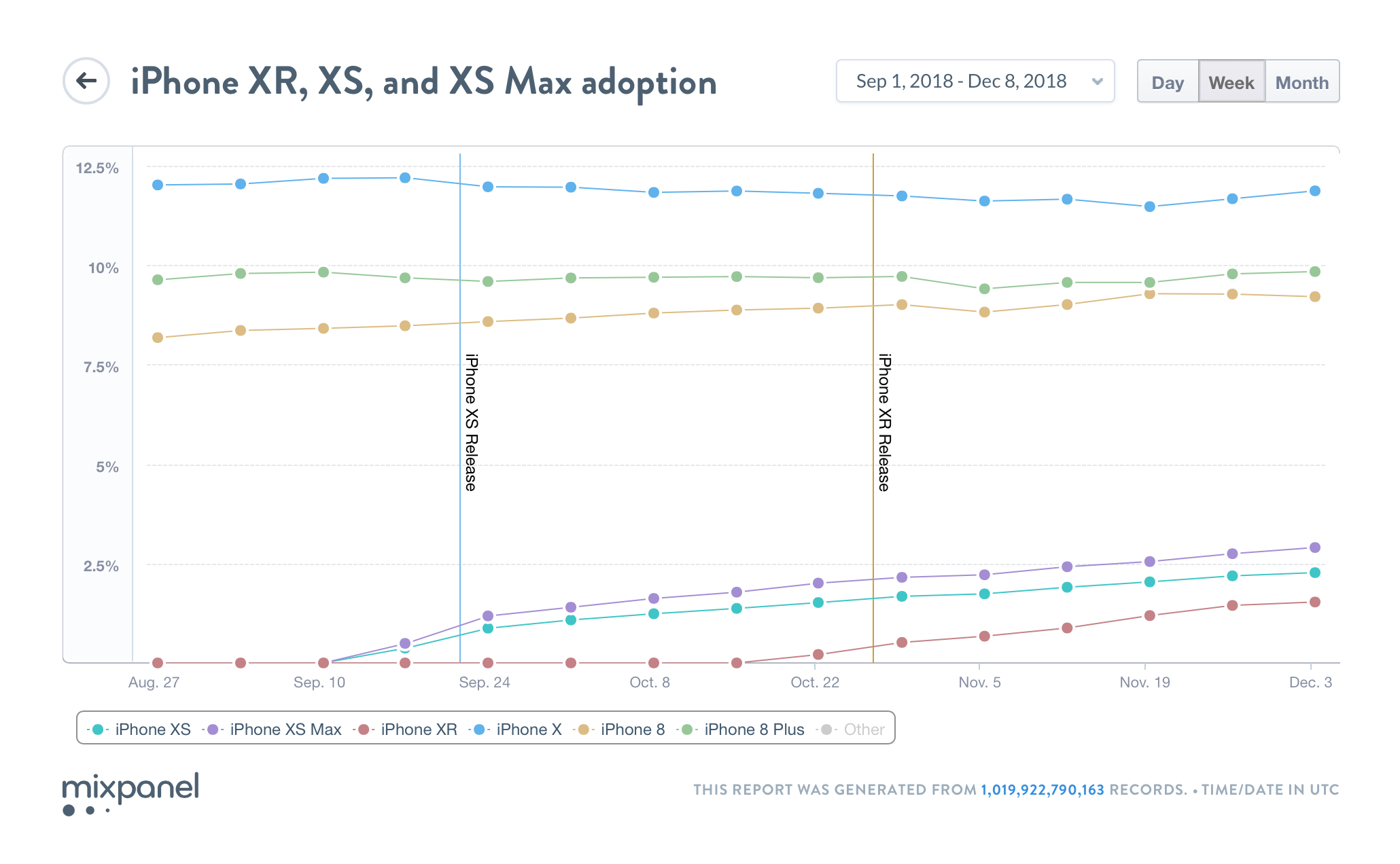
If you look at the iPhone XS and iPhone XS Max data combined, however, the iPhone XR is regularly outsold by that combination. This shouldn’t necessarily come as a surprise, though, as it’s not necessarily a fair comparison to compare two models versus one.
iPhone 8, iPhone 8 Plus, and iPhone X adoption is also holding steady. In fact, there are some weeks where adoption numbers actually increase for those last-generation devices. As of December 8th, iPhone X adoption is at 11.39 percent, followed by the iPhone 8 Plus at 9.31 percent, and the iPhone 8 at 9.22 percent.
One interesting thing to look at, however, is the adoption rate of the iPhone 8, iPhone 8 Plus, and iPhone X after launch last year, in comparison to the iPhone XS, iPhone XS Max, and iPhone XR this year.
Mixpanel explains that five weeks after launch, the iPhone XR sat at 1.5 percent adoption, whereas the iPhone 8 and iPhone 8 Plus secured 3.6 percent adoption during the same period following its launch.
For the higher-end iPhone models, Mixpanel looks at adoption over the two month period after launch. The iPhone X secured approximately 7 percent adoption during this time, while the iPhone XS and iPhone XS Max secured approximately 5 percent adoption.
You can view Mixpanel’s interactive iPhone adoption charts here and here. Ultimately, the data shows that the iPhone XS and iPhone XS Max are off to a slower start than last year’s iPhone X, but the iPhone XR is indeed the best-selling iPhone, as Apple suggested last month.
Source: 9to5mac










