
NEWS

Apple Confirms the Unexplained Drop is a Bug in App Store Ratings

12/18/2018

2299

Update: The Apple Post spotted tweets about the issue.


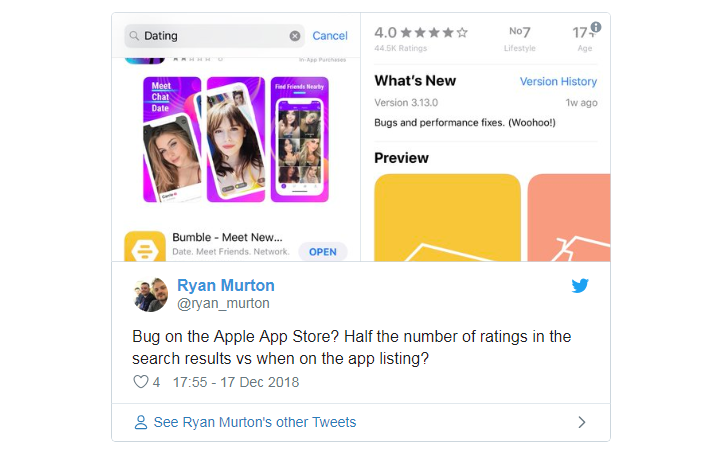
Developers are reporting seeing a random drop in app ratings in what is believed to be a bug with the App Store Ratings & Reviews system, with some apps seeing a sharp decline in star-ratings, and others claiming to see missing written reviews and developer responses.


A handful of developers, such as freelance developer Mike Irving have taken to Twitter to share their confusion and theories on what may have caused the missing App Store data.

Apple Confirms the Unexplained Drop is a Bug in App Store Ratings

Developers were reporting seeing a random drop in app ratings in what is believed to be a bug with the App Store Ratings & Reviews system, with some apps seeing a sharp decline in star-ratings, and others claiming to see missing written reviews and developer responses.


A handful of developers, such as freelance developer Mike Irving have taken to Twitter to share their confusion and theories on what may have caused the missing App Store data.


While a bug on Apple’s side is most likely to blame for the unexplained drop, some suggest a new App Store algorithm may be the culprit of the missing ratings, or possibly even a purge of outdated user ratings and reviews, although the latter seems unlikely given the lack of prior notification from Apple.


So far it appears the apparent glitch is only affecting the App Store on iOS, but if you’re a developer who’s seen a sudden drop in ratings on the Mac App Store then please let us know in the comments below.


Source: theapplepost

Windows
Mac OS
iOS
Linux
3uTools
Win 64-bit For this device
V9.01 2025-12-27
Download
Win 32-bit For this device
V9.01 2025-12-27
Download
3uTools
Intel Chip How to Identify Chip Type
V9.01 2025-12-31
Download
Apple Silicon
V9.01 2025-12-31
Download
How to Identify Chip Type
1.  Click the Apple icon in the top-left corner of the screen and select About This Mac.
2.  Check the Processor or Chip field to determine if it is "Intel" or "Apple".
Please use the 3uTools PC client to install the iOS client:
1、 Install either the Windows or Mac version of 3uTools on your computer
2、 Open the PC client and connect your device to the computer via USB cable
3、 After the connection is successful, wait for the computer to automatically install the mobile app for the device, or locate “Install Mobile App” on the computer and manually click to install.
3uTools
deb file
V3.01 2025-11-20
Download
rpm file
V3.01 2025-11-20
Download
Windows
Windows
iOS
iOS
Android
Android
TV
TV
3uAirPlayer
Win 64-bit For this device
V6.0.2 2025-11-19
Download
Win 32-bit For this device
V6.0.2 2025-11-19
Download
iOS Device Mirroring (No App Required)
1、 Install 3uAirPlayer on the Windows PC
2、 Open Control Center and select Screen Mirroring
3、 From the list, choose your PC to start mirroring
4、 Or connect your iOS device to the PC via USB to begin mirroring
Scan to get "3uAirPlayer" App
3uAirPlayer TV V1.0.18
2025-11-28
TV System Requirements: Android 7.0 or later
Download the TV installation package, copy it to a USB drive, insert it into your TV or set-top box, then select the file from the home screen to install.




