
NEWS

Apple Just Patented Their Next Game-Changing Product “iRing”

01/22/2019

2428

Apple has had an almost unchanged product lineup for quite some time now. But this may change soon with Apple seemingly gearing up for another game-changing product!
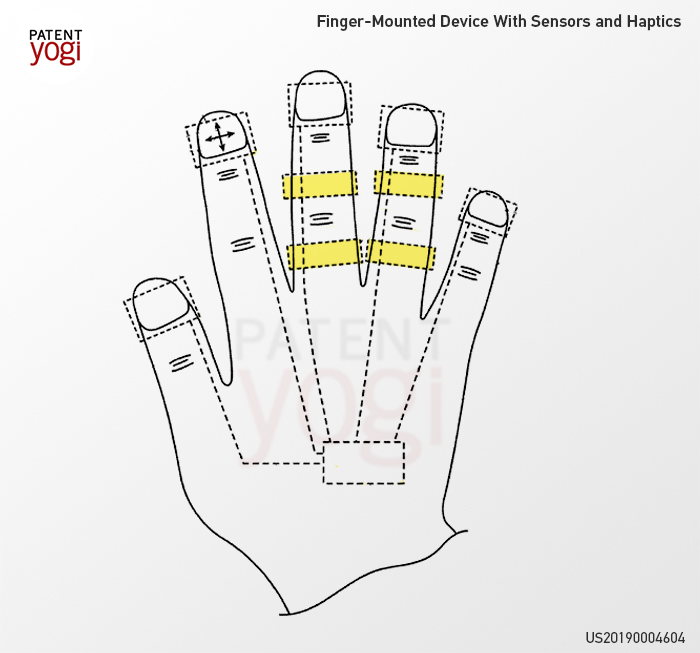

 Apple Just Patented Their Next Game-Changing Product “iRing”


A recently published patent from Apple reveals smart rings that are connected with external devices such as smartphones or gaming consoles. The rings include multiple sensors (like force sensors and accelerometers), and haptic output devices. The sensors in the rings capture information on how firmly you press against objects using finger press, finger tap, or finger swipe. A haptic output is then provided to confirm a press, tap, or swipe.


For example, the rings will allow you to interact with a virtual keyboard providing the sensations similar to a physical keyboard. Further, the rings can connect to gaming consoles or computers, and provide joystick-type input only using the movement of fingertips.


This invention could be the next big thing for Apple, and for consumer electronics. Wearable devices have been used to operate other devices, but a device that can seamlessly control different devices with different types of inputs is indeed radical. It remains to be seen how soon Apple releases this groundbreaking product. I’m guessing they will call it “iRing.”


Source: thenextweb

Windows
Mac OS
iOS
Linux
3uTools
Win 64-bit For this device
V9.01 2025-12-27
Download
Win 32-bit For this device
V9.01 2025-12-27
Download
3uTools
Intel Chip How to Identify Chip Type
V9.01 2025-12-31
Download
Apple Silicon
V9.01 2025-12-31
Download
How to Identify Chip Type
1.  Click the Apple icon in the top-left corner of the screen and select About This Mac.
2.  Check the Processor or Chip field to determine if it is "Intel" or "Apple".
Please use the 3uTools PC client to install the iOS client:
1、 Install either the Windows or Mac version of 3uTools on your computer
2、 Open the PC client and connect your device to the computer via USB cable
3、 After the connection is successful, wait for the computer to automatically install the mobile app for the device, or locate “Install Mobile App” on the computer and manually click to install.
3uTools
deb file
V3.01 2025-11-20
Download
rpm file
V3.01 2025-11-20
Download
Windows
Windows
iOS
iOS
Android
Android
TV
TV
3uAirPlayer
Win 64-bit For this device
V6.0.2 2025-11-19
Download
Win 32-bit For this device
V6.0.2 2025-11-19
Download
iOS Device Mirroring (No App Required)
1、 Install 3uAirPlayer on the Windows PC
2、 Open Control Center and select Screen Mirroring
3、 From the list, choose your PC to start mirroring
4、 Or connect your iOS device to the PC via USB to begin mirroring
Scan to get "3uAirPlayer" App
3uAirPlayer TV V1.0.18
2025-11-28
TV System Requirements: Android 7.0 or later
Download the TV installation package, copy it to a USB drive, insert it into your TV or set-top box, then select the file from the home screen to install.




