 NEWS
NEWS
Apple's Shock iPhone Redesign Suddenly Makes Sense
 08/05/2019
 3008
3008
There are a lot of reasons to avoid Apple’s new iPhone 11 range, including how they look on the outside. But inside, it’s a different story.
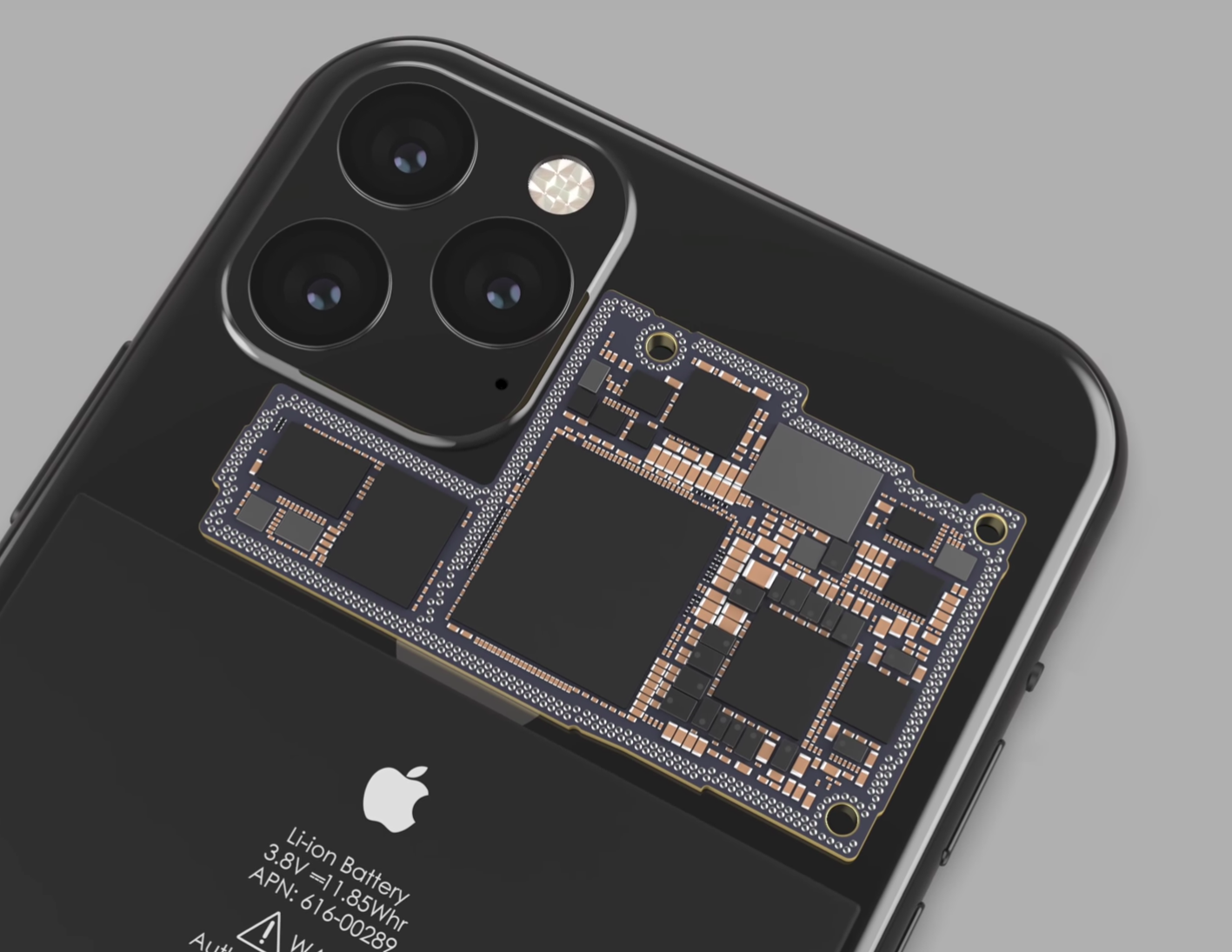
In a new exclusive, hugely popular YouTuber Filip Koroy (aka EverythingApplePro) has teamed up with industry insider Frederico Cerva to reveal the radical changes Apple has made to the iPhone 11’s logic board. And not only does this deliver the most exciting upgradesthe range will bring, it also makes a leap 12 years into the past to do so.
“The amazing thing here is that it’s almost a tribute to the original iPhone,” says Koroy. “Comparing them, they have the same layout inside... was Steve just right from the very beginning?”
Looking closer, you’d have to conclude he was. The ‘new old’ layout sees the vertically aligned logic board of the iPhone XS returned to its original horizontal position above the battery at the top of the phone. This orientation enables the board to fit a large connector right beside the massive new triple rear camera while also freeing up space for a significantly larger battery.
“We heard earlier that there would be some layout changes to the [new] iPhone,” says Koroy, “now it makes sense”.
Furthermore, the changes Apple is introducing inside the iPhone 11 look set to become the foundation for iPhone design for years to come. Accompanying the new logic board is a smaller Leap Motion haptics engine which will replace 3D Touch (again freeing up space) and all this battery capacity will be heavily tested in 2020 because that is when the iPhone range will move to 5G.
And yet here’s the flip side: the iPhone 11 is little more than a bridging device. It will be the last iPhone X-inspired model before Apple’s external redesign in 2020. Next year’s iPhones will also bring new screen sizes, 120Hz refresh rates, camera tech removed from the iPhone 11, a switch to USB-C and the potential return of Touch ID all alongside the aforementioned jump from 4G to 5G.
So while the inside of the iPhone 11 will give you a taste of the future, it is little more than a placeholder before Apple’s real fireworks begin.
Source: forbes










