
NEWS

Teardown Suggests Apple Watch Series 5 Components are Close to Identical to Series 4

09/26/2019

2911

The internals of the Apple Watch Series 5 are almost identical to the internal components of the previous-generation Apple Watch Series 4, according to a new teardown conducted by repair site iFixit. 

That should come as no surprise as the two devices are identical in design, with the major differentiating factor being the Always-On display in the newer model. 
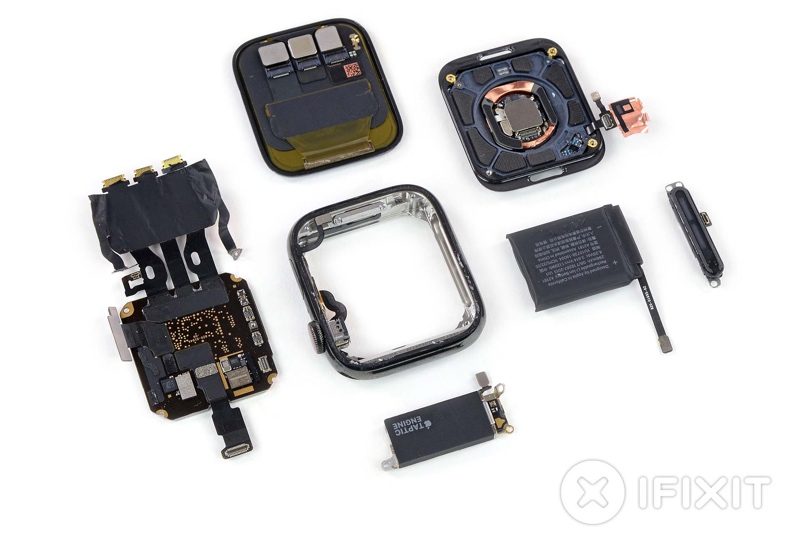
Teardown Suggests Apple Watch Series 5 Components are Close to Identical to Series 4
iFixit hoped to get a look at the changes implemented to allow for the Always-On display, but much of what's new relates to display technology and is "invisible to the human eye." 

The site did spot a new ambient light sensor embedded under the OLED panel, and Apple says there are more advanced display drivers and an improved power management chip in the Series 5 as well. 

There's a new built-in compass and the battery is slightly bigger than the battery in the Series 4 (1.4% larger in the 44mm model). The Series 5 chip includes 32GB of storage, up from 16GB, and the new compass, but it features the same GPU and CPU as the Series 4 so there are no real performance improvements. 
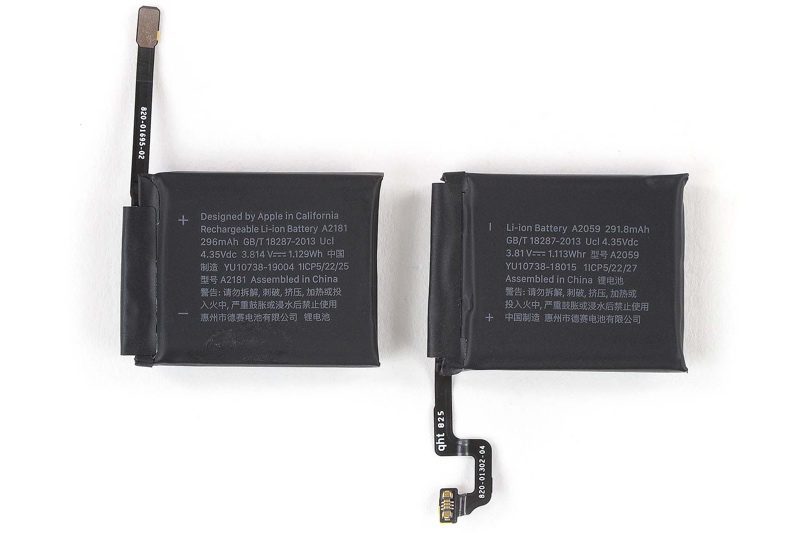
Teardown Suggests Apple Watch Series 5 Components are Close to Identical to Series 4
iFixit says there are minor changes to connectors for the Taptic Engine, display, and battery, which means components are not generally interchangeable, but otherwise, the two devices are "very similar" on the inside.


Source: MacRumors

Windows
Mac OS
iOS
Linux
3uTools
Win 64-bit For this device
V9.01 2025-12-27
Download
Win 32-bit For this device
V9.01 2025-12-27
Download
3uTools
Intel Chip How to Identify Chip Type
V9.01 2025-12-31
Download
Apple Silicon
V9.01 2025-12-31
Download
How to Identify Chip Type
1.  Click the Apple icon in the top-left corner of the screen and select About This Mac.
2.  Check the Processor or Chip field to determine if it is "Intel" or "Apple".
Please use the 3uTools PC client to install the iOS client:
1、 Install either the Windows or Mac version of 3uTools on your computer
2、 Open the PC client and connect your device to the computer via USB cable
3、 After the connection is successful, wait for the computer to automatically install the mobile app for the device, or locate “Install Mobile App” on the computer and manually click to install.
3uTools
deb file
V3.01 2025-11-20
Download
rpm file
V3.01 2025-11-20
Download
Windows
Windows
iOS
iOS
Android
Android
TV
TV
3uAirPlayer
Win 64-bit For this device
V6.0.2 2025-11-19
Download
Win 32-bit For this device
V6.0.2 2025-11-19
Download
iOS Device Mirroring (No App Required)
1、 Install 3uAirPlayer on the Windows PC
2、 Open Control Center and select Screen Mirroring
3、 From the list, choose your PC to start mirroring
4、 Or connect your iOS device to the PC via USB to begin mirroring
Scan to get "3uAirPlayer" App
3uAirPlayer TV V1.0.18
2025-11-28
TV System Requirements: Android 7.0 or later
Download the TV installation package, copy it to a USB drive, insert it into your TV or set-top box, then select the file from the home screen to install.




