
NEWS

Apple Offers Disaster Relief Program for Apple Card Holders

10/10/2019

2260

The Apple Card comes with a Disaster Relief Program, according to a MacRumors readerwho lives in Houston and recently experienced some flooding from tropical storm Imelda. 

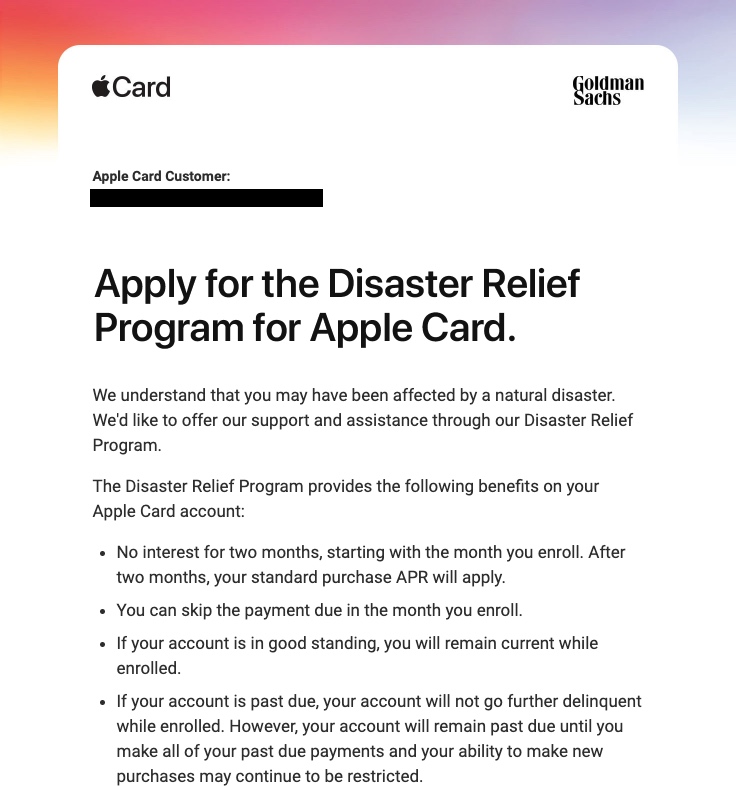
Apple sent MacRumors reader Frequeniquity an email suggesting that he apply for the program after Apple detected that he "may have been affected by a natural disaster." 
Apple Offers Disaster Relief Program for Apple Card Holders


Emails sent out by Apple, which were also received by another MacRumors reader, offer the following benefits: 


  • No interest for two months, starting with the month you enroll. After two months, your standard purchase APR will apply.

  • You can skip the payment due in the month you enroll.

  • If your account is in good standing, you will remain current while enrolled.

  • If your account is past due, your account will not go further delinquent while enrolled. However, your account will remain paste due until you make all of your past due payments and your ability to make new purchases may continue to be restricted.


According to the email sent out to  Apple Card  users, those interested in applying for the Disaster Relief Program should contact an  Apple Card  Specialist after receiving an email. 

Apple appears to be sending out these emails to customers who have addresses registered in areas where a natural disaster has occurred, and presumably this will be a benefit offered to all  Apple Card  users who are experiencing issues like floods, fires, earthquakes, and other issues.


Source: Macrumors

Windows
Mac OS
iOS
Linux
3uTools
Win 64-bit For this device
V9.01 2025-12-27
Download
Win 32-bit For this device
V9.01 2025-12-27
Download
3uTools
Intel Chip How to Identify Chip Type
V9.01 2025-12-31
Download
Apple Silicon
V9.01 2025-12-31
Download
How to Identify Chip Type
1.  Click the Apple icon in the top-left corner of the screen and select About This Mac.
2.  Check the Processor or Chip field to determine if it is "Intel" or "Apple".
Please use the 3uTools PC client to install the iOS client:
1、 Install either the Windows or Mac version of 3uTools on your computer
2、 Open the PC client and connect your device to the computer via USB cable
3、 After the connection is successful, wait for the computer to automatically install the mobile app for the device, or locate “Install Mobile App” on the computer and manually click to install.
3uTools
deb file
V3.01 2025-11-20
Download
rpm file
V3.01 2025-11-20
Download
Windows
Windows
iOS
iOS
Android
Android
TV
TV
3uAirPlayer
Win 64-bit For this device
V6.0.2 2025-11-19
Download
Win 32-bit For this device
V6.0.2 2025-11-19
Download
iOS Device Mirroring (No App Required)
1、 Install 3uAirPlayer on the Windows PC
2、 Open Control Center and select Screen Mirroring
3、 From the list, choose your PC to start mirroring
4、 Or connect your iOS device to the PC via USB to begin mirroring
Scan to get "3uAirPlayer" App
3uAirPlayer TV V1.0.18
2025-11-28
TV System Requirements: Android 7.0 or later
Download the TV installation package, copy it to a USB drive, insert it into your TV or set-top box, then select the file from the home screen to install.




