NEWS

Another Render of a Potential 2019 iPhone Design with Triple-lens Camera Emerges

01/16/2019

2615

Another Render of a Potential 2019 iPhone Design with Triple-lens Camera Emerges


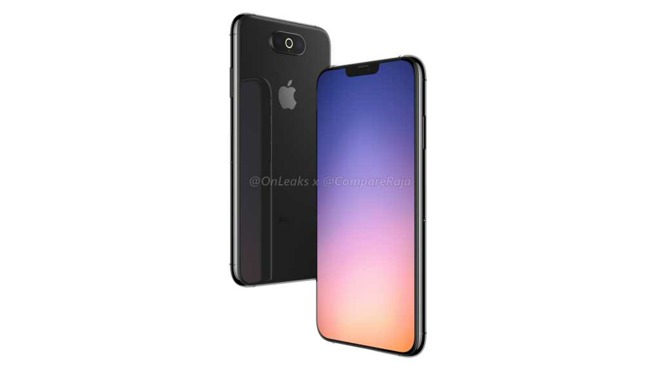
The proposed module would sport three lenses in a centered, horizontal alignment, plus a ring flash around the middle one, according to CompareRaja and well-known leak source Steve Hemmerstoffer, better known as @OnLeaks. Hemmerstoffer was also responsible for another set of published renders showing a corner-based triple-lens design.

Both renders are allegedly based on "100 percent legit prototypes," but Apple is still said to be in the engineering validation testing (EVT) phase and yet to settle on a final layout. As before it's claimed that Apple is preparing three new iPhones for launch in September 2019, and it's not certain which model(s) the renders represent.

There's currently no way of verifying the authenticity of the two leaks. A centered camera module would mark a definite break from past iPhones, which have always used corner cameras and never a ring flash. Apple has also moved away from horizontal alignments beginning with the iPhone X, operating on the idea that vertical is better for augmented reality.

That may or may not be an obstacle though, and Apple might prefer symmetry as well as a decreased chance of fingers covering the lens.

As with the previous version, the authenticity of the data leading to the render cannot be confirmed. This design seems even less probable at first glance, given the loss of internal space in the center of the device that the design would require.


Source: appleinsider

Windows
Mac OS
iOS
Linux
3uTools
Win 64-bit For this device
V9.01 2025-12-27
Download
Win 32-bit For this device
V9.01 2025-12-27
Download
3uTools
Intel Chip How to Identify Chip Type
V9.01 2025-12-31
Download
Apple Silicon
V9.01 2025-12-31
Download
How to Identify Chip Type
1.  Click the Apple icon in the top-left corner of the screen and select About This Mac.
2.  Check the Processor or Chip field to determine if it is "Intel" or "Apple".
Please use the 3uTools PC client to install the iOS client:
1、 Install either the Windows or Mac version of 3uTools on your computer
2、 Open the PC client and connect your device to the computer via USB cable
3、 After the connection is successful, wait for the computer to automatically install the mobile app for the device, or locate “Install Mobile App” on the computer and manually click to install.
3uTools
deb file
V3.01 2025-11-20
Download
rpm file
V3.01 2025-11-20
Download
Windows
Windows
iOS
iOS
Android
Android
TV
TV
3uAirPlayer
Win 64-bit For this device
V6.0.2 2025-11-19
Download
Win 32-bit For this device
V6.0.2 2025-11-19
Download
iOS Device Mirroring (No App Required)
1、 Install 3uAirPlayer on the Windows PC
2、 Open Control Center and select Screen Mirroring
3、 From the list, choose your PC to start mirroring
4、 Or connect your iOS device to the PC via USB to begin mirroring
Scan to get "3uAirPlayer" App
3uAirPlayer TV V1.0.18
2025-11-28
TV System Requirements: Android 7.0 or later
Download the TV installation package, copy it to a USB drive, insert it into your TV or set-top box, then select the file from the home screen to install.