 NEWS
NEWS
Huawei Propagandists Attack Apple While Using iPhone
 05/22/2019
 3340
3340
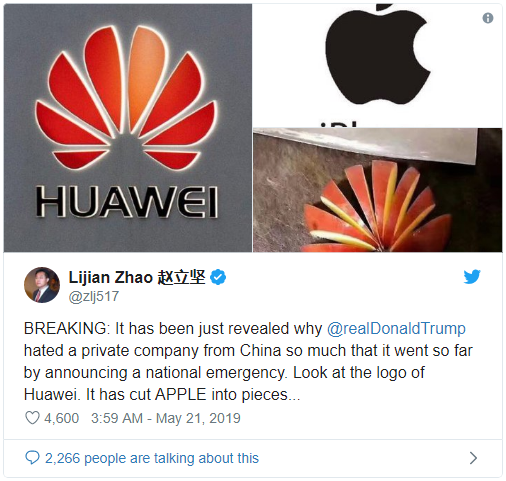
Both Apple and Huawei are entangled in the US and China trade war as tensions have grown over the last few weeks. A ‘Boycott Apple’ movement has gained steam in China, and many in the country are singing the praises of local tech giant Huawei while Trump has banned the company’s products. The latest example is a Chinese diplomat who has attacked Apple on Twitter saying Huawei has “cut Apple into pieces” but hilariously, he did it from an iPhone.
As reported by Bloomberg, Zhao Lijian, deputy chief of mission at the Chinese embassy in Islamabad tweeted the following:
BREAKING: It has been just revealed why @realDonaldTrump hated a private company from China so much that it went so far by announcing a national emergency. Look at the logo of Huawei. It has cut APPLE into pieces…
The Huawei logo looking like a sliced up apple isn’t a new joke as others have been using it during the recent Apple boycott movement, but as noted by the first reply to his tweet, the most notable and funniest part is that Lijian shared the tweet from an iPhone. We’ve seen some big goofs like Samsung promoting the Galaxy Note 9 from an iPhone and Huawei itself doing the same with a New Year’s tweet, but this latest example may take the cake for the most humorous blunder as the politician tried to throw shade at Apple while using its device.
As for how the companies performed last quarter, estimates put Huawei at an impressive 50% growth of smartphone shipments for the period YoY, while the rest of the industry and Apple saw a notable decline. Even so, Apple’s overall business created over two times the revenue that Huawei did for the March quarter with $58 billion compared to roughly $25 billion for Huawei.
If the US’ current blacklisting of Huawei continues, the company will certainly have an uphill battle going forward. The Chinese company isn’t able to import US components such as Qualcomm chips and is even having to switch to its own operating system as Google has to cease its relationship and pull Android licensing from Huawei.
Source: 9to5mac










