 NEWS
NEWS
Apple's HomePod launches in Japan this summer
 07/10/2019
 2746
2746
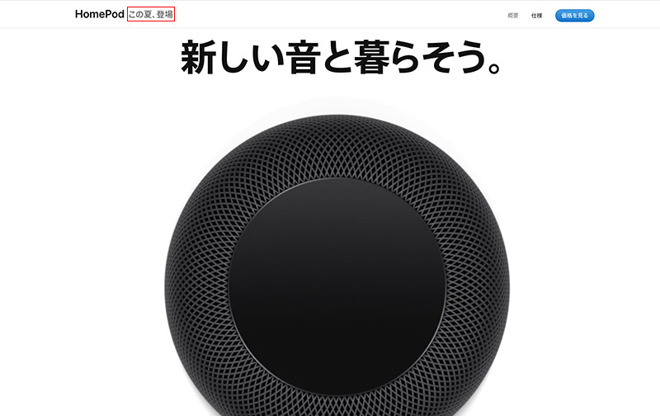
HomePod is set to arrive in Japan sometime this summer, according to Apple's regional website. The product's landing page was recently updated to reflect pending availability, with new text reading "coming this summer," reports Mac Otakara.
A listing for the device has also appeared on the company's online storefront. At launch, HomePod will be available for 32,000 yen ($294) in the usual white and Space Gray color options.
HomePod's arrival in Japan comes nearly one and a half years after the smart speaker debuted in the Australia, the U.S. and UK in February 2018, and almost two years after it was unveiled at Apple's Worldwide Developers Conference in 2017.
Apple extended HomePod sales into other international markets across 2018 with launches in China and Hong Kong in January, Canada, France and Germany in June, and Mexico and Spain in October.
Powered by an A8 chip, HomePod features advanced audio features like realtime acoustic modeling, audio beam-forming and multi-channel echo cancelation, while Apple's custom silicon supports onboard Siri functionality. Marketed as a high-end speaker, Apple's device comes packed with seven horn-loaded tweeters, six beam-forming microphones and a central up-firing subwoofer.
HomePod has received a number of software upgrades since launch, most recently adding voice call capabilities, support for multiple timers and search by song lyrics in a September update. Additional features including voice-recognizing multi-user support, song Handoff with iPhone and Shortcuts integration are due when iOS 13 sees release this fall.
Source: AppleInsider










