 NEWS
NEWS
Pixar Poster Signed by Steve Jobs Sells for $31,250 at Auction
 09/03/2019
 3975
3975
A poster for Pixar Animation Studios' 1995 film 'Toy Story' signed by late Apple co-founder Steve Jobs has gone on sale, with an auction for the 'incredibly scarce' artifact raising $31,250 after bidding closed on Thursday evening.
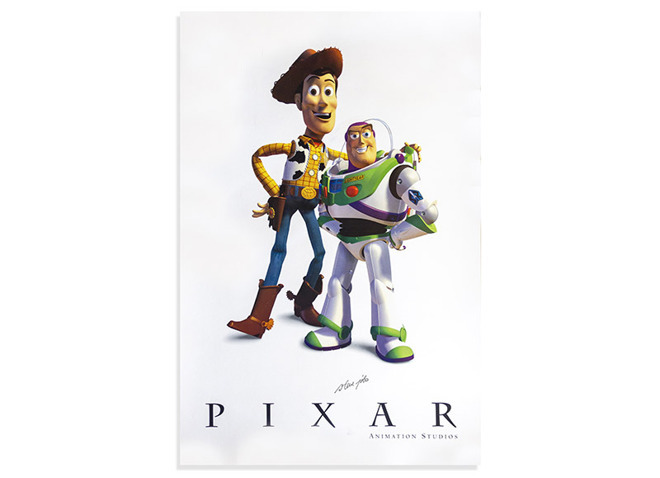
Measuring 24 inches-by-36 inches, the poster features the main characters Woody and Buzz, voiced by Tom Hanks and Tim Allen in the groundbreaking computer-animated work. The poster's highlight feature is the inclusion of Steve Jobs' signature just above the Pixar logo, towards the bottom of the poster, signed by the luminary in 1995.
According to R.R. Auctions, the venue for the sale of the poster, this is the second time a poster signed by Jobs has gone on sale. The first, a Networld Expo poster from 1992, was sold in 2017 for $19,640.
Jobs was a backer of Pixar, helping develop the studios which started as a branch of Lucasfilm. A co-founder of the company, Jobs poured millions of dollars of his own money into the firm, and worked as its chairman and later the CEO.
The Apple CEO earned an estimated $4 billion from the purchase of Pixar by Disney in 2006. Due to having close to a 50% personal stake in Pixar, he became Disney's largest individual shareholder, and had a seat at its board of directors.
Jobs continues to be an influence at Pixar, prompting the studio to rename its main campus office building in his honor.
Earlier auctions for items featuring Jobs' signature include a newspaper clipping that sold for $27,000, a first-issue of Macworld for over $47,000, and a job application for over $174,000. The high price is partially linked to the reluctance of Jobs to hand out his signature, with there believed to be fewer than 10 autographed items in existence.
Source: Appleinsider










