
NEWS

Siri Learns to Play News Podcasts Automatically

01/17/2018

2848

Now you can stay informed about the events of the day without ever touching your phone, thanks to a new podcast tweak to the hands-free mode in Apple's personal digital assistant.


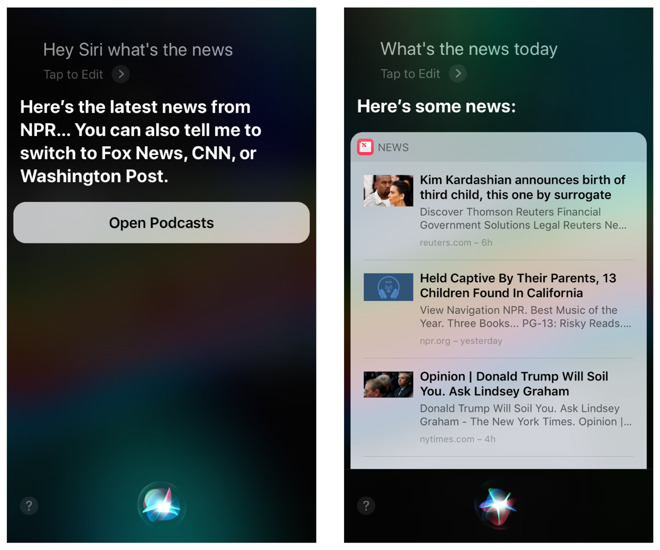
New news functionality using Hey Siri, left, vs. manual invocation, right.

Siri Learns to Play News Podcasts Automatically


To try out Siri's new smarts, just say "hey Siri, what's the news today." If you're located in the U.S., she'll automatically begin playing the latest news podcast from NPR. 


Those with different tastes in information can choose to listen instead to Fox News, CNN, or the Washington Post. The selection varies from country to country, as noted by MacRumors - UK listeners have options including the BBC, Sky News, and LBC.


What's not clear is why Apple chose to have Siri play a generic podcast rather than reading news headlines aloud. Users of Apple News can choose which subjects are important to them, and Siri previously relied on this self-curation to display the news in text format. 


Indeed, if you activate Siri by using a button on your device, she will simply revert to showing you headlines from Apple News.


Those wishing to give the new podcast functionality a shot will need iOS 11.2.2 to do so. An update is highly recommended even if you aren't interested in the news - iOS 11.2.2 contains important security updates to deal with the recent Meltdown and Spectre vulnerabilities.


Source: appleinsider

Windows
Mac OS
iOS
Linux
3uTools
Win 64-bit For this device
V9.01 2025-12-27
Download
Win 32-bit For this device
V9.01 2025-12-27
Download
3uTools
Intel Chip How to Identify Chip Type
V9.01 2025-12-31
Download
Apple Silicon
V9.01 2025-12-31
Download
How to Identify Chip Type
1.  Click the Apple icon in the top-left corner of the screen and select About This Mac.
2.  Check the Processor or Chip field to determine if it is "Intel" or "Apple".
Please use the 3uTools PC client to install the iOS client:
1、 Install either the Windows or Mac version of 3uTools on your computer
2、 Open the PC client and connect your device to the computer via USB cable
3、 After the connection is successful, wait for the computer to automatically install the mobile app for the device, or locate “Install Mobile App” on the computer and manually click to install.
3uTools
deb file
V3.01 2025-11-20
Download
rpm file
V3.01 2025-11-20
Download
Windows
Windows
iOS
iOS
Android
Android
TV
TV
3uAirPlayer
Win 64-bit For this device
V6.0.2 2025-11-19
Download
Win 32-bit For this device
V6.0.2 2025-11-19
Download
iOS Device Mirroring (No App Required)
1、 Install 3uAirPlayer on the Windows PC
2、 Open Control Center and select Screen Mirroring
3、 From the list, choose your PC to start mirroring
4、 Or connect your iOS device to the PC via USB to begin mirroring
Scan to get "3uAirPlayer" App
3uAirPlayer TV V1.0.18
2025-11-28
TV System Requirements: Android 7.0 or later
Download the TV installation package, copy it to a USB drive, insert it into your TV or set-top box, then select the file from the home screen to install.




